The Impatient Programmer's Guide to Bevy and Rust: Chapter 6 - Let There Be Particles
By the end of this chapter, you’ll have built a particle system that brings magical powers to life. You’ll create four unique effects (Fire, Arcane, Shadow, and Poison), each with glowing particles that move, rotate, and fade. You’ll learn how to create particle emitters, write a custom shader for glowing effects, and use additive blending to make particles that feel magical.
Prerequisites: This is Chapter 6 of our Bevy tutorial series. Join our community for updates on new releases. Before starting, complete Chapter 1: Let There Be a Player, Chapter 2: Let There Be a World, Chapter 3: Let The Data Flow, Chapter 4: Let There Be Collisions, and Chapter 5: Let There Be Pickups, or clone the Chapter 5 code from this repository to follow along.
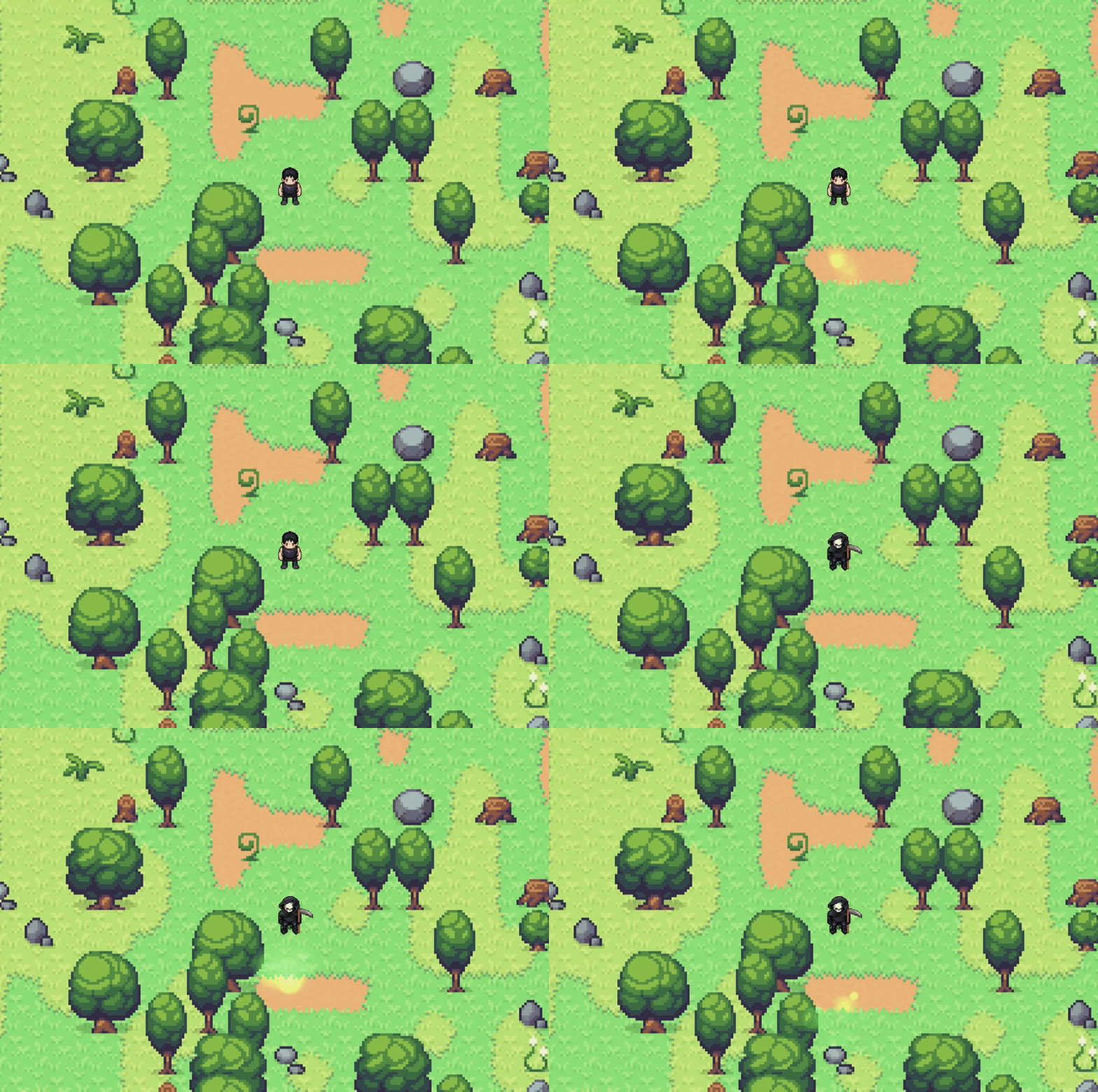
Let’s Give Your Players Magic Powers
By the end of this chapter, you’ll learn:
- How to spawn and update thousands of particles efficiently
- Add variance for organic, natural looking effects
- Custom shaders with additive blending for that magical glow
- Building a flexible system that’s easy to extend
- Give your player magical powers
Understanding Particle Systems
A particle system spawns many small sprites that each:
- Spawn from an emitter with initial properties (position, velocity, color, size)
- Live for a short time, moving and changing
- Die when their lifetime expires
The magic is in the numbers: spawn enough particles with slight variations, and they combine to create complex, beautiful effects.
Building the Particle System
Each particle needs to be independent—moving, rotating, fading, and shrinking on its own. To achieve this, we need two types of properties: physics (how it moves) and visuals (how it looks). The physics properties like velocity, acceleration, and angular velocitygive particles realistic motion.
Watch particles move (velocity), rotate (angular velocity), shrink (scale curve), and fade (color curve)
Particles shouldn’t live forever. A fire particle needs to burn out, a magic spell needs to fade away. But particles also need smooth animations as they age, they should gradually fade, shrink, and change color over time, not just blink out of existence.
To make this happen, particles need to track two things: when to die and how far along they are in their life. That’s why we use a countdown timer paired with progress tracking.
A countdown timer (lifetime) tells us when to delete the particle, but not its progress value. A particle with 0.5s left could be 25% done (started at 2.0s) or 99% done (started at 0.51s).
We need both values:
lifetime- time remainingmax_lifetime- original duration
Then: progress = 1.0 - (lifetime / max_lifetime)
Now we know exactly where the particle is: 0% at birth, 50% at midpoint, 100% at death. This progress value drives all animations like color, size, opacity. Without both values, particles just blink on/off. With both, they transition smoothly.
Watch two particles with different max_lifetimes die at different times
Particle Components
Now that we understand what properties particles need, let’s create these variables for our particle system. We’ll bundle them into a Particle component that tracks everything from physics to visuals.
Create particles folder inside src and add src/particles/components.rs:
// src/particles/components.rs
use bevy::prelude::*;

/// A single particle in the particle system
#[derive(Component, Clone)]
pub struct Particle {
    pub velocity: Vec3,           // Movement speed and direction (units/sec)
    pub lifetime: f32,             // Remaining time before death (seconds)
    pub max_lifetime: f32,         // Original lifetime for progress calculation
    pub scale: f32,                // Current size multiplier
    pub angular_velocity: f32,     // Rotation speed (radians/sec)
    pub acceleration: Vec3,        // Forces like gravity (units/sec²)
    // Color curve support (start → mid → end)
    pub start_color: Color,        // Color at birth (0% lifetime)
    pub mid_color: Color,          // Color at midpoint (50% lifetime)
    pub end_color: Color,          // Color at death (100% lifetime)
    // Scale curve support
    pub start_scale: f32,          // Size at birth
    pub end_scale: f32,            // Size at death (usually smaller)
}
Why three colors?
We animate color over the particle’s lifetime using a curve:
- Start (bright) → Mid (dimmer) → End (fade to black)
This creates smooth transitions. A simple blend between two colors looks linear and boring. Three control points give us more expressive fading.
Watch how a Shadow particle smoothly transitions through three color keyframes
The Particle struct holds all the data, but we need methods to:
- Create particles easily - A constructor that sets sensible defaults
- Customize particles - Builder methods to override specific properties
- Calculate animations - Methods that compute current color and scale based on lifetime progress
Without these methods, every system that renders particles would need to duplicate this logic. By centralizing it here, we ensure consistency and make the code easier to maintain.
Let’s implement the particle methods:
// Append to src/particles/components.rs

impl Particle {
    pub fn new(velocity: Vec3, lifetime: f32, scale: f32, start_color: Color) -> Self {
        Self {
            velocity,
            lifetime,
            max_lifetime: lifetime,
            scale,
            angular_velocity: 0.0,
            acceleration: Vec3::ZERO,
            start_color,
            mid_color: start_color,  // Default to same color
            end_color: start_color,
            start_scale: scale,
            end_scale: scale * 0.5,  // Default: shrink to half
        }
    }

    pub fn with_angular_velocity(mut self, angular_velocity: f32) -> Self {
        self.angular_velocity = angular_velocity;
        self
    }

    pub fn with_acceleration(mut self, acceleration: Vec3) -> Self {
        self.acceleration = acceleration;
        self
    }

    /// Set color curve for smooth color transitions
    pub fn with_color_curve(mut self, mid: Color, end: Color) -> Self {
        self.mid_color = mid;
        self.end_color = end;
        self
    }

    /// Set scale curve
    pub fn with_scale_curve(mut self, end_scale: f32) -> Self {
        self.end_scale = end_scale;
        self
    }

    /// Returns the normalized lifetime progress (0.0 to 1.0)
    pub fn progress(&self) -> f32 {
        1.0 - (self.lifetime / self.max_lifetime)
    }

    /// Get interpolated color based on lifetime progress
    pub fn current_color(&self) -> Color {
        let progress = self.progress();

        if progress < 0.5 {
            // First half: start → mid
            let t = progress * 2.0;  // Remap 0.0-0.5 to 0.0-1.0
            self.start_color.mix(&self.mid_color, t)
        } else {
            // Second half: mid → end
            let t = (progress - 0.5) * 2.0;  // Remap 0.5-1.0 to 0.0-1.0
            self.mid_color.mix(&self.end_color, t)
        }
    }

    /// Get interpolated scale based on lifetime progress
    pub fn current_scale(&self) -> f32 {
        let progress = self.progress();
        self.start_scale.lerp(self.end_scale, progress)
    }
}
The Builder Pattern
Methods like with_angular_velocity() and with_color_curve() use the builder pattern, a Rust idiom for constructing complex objects step-by-step. Each method:
- Takes
self(ownership of the particle) - Modifies one field
- Returns
selfback
This lets us chain calls together:
// Pseudo code, don't use
Particle::new(velocity, 1.0, 2.0, Color::RED)
    .with_angular_velocity(3.14)
    .with_color_curve(Color::ORANGE, Color::BLACK)
    .with_scale_curve(0.1)
Clean, readable, and flexible. You only specify what you need to customize, everything else uses defaults from new().
The Calculation Methods
Methods like progress(), current_color(), and current_scale() are where the magic happens. They compute values based on the particle’s current state:
progress()- Converts remaining lifetime into a 0.0-1.0 percentage, so we know exactly where the particle is in its life cycle (just born at 0%, halfway through at 50%, about to die at 100%)current_color()- Blends smoothly between the three colors based on progress, creating that magical fade effect where fire particles glow bright orange then dim to black, or poison clouds shift from sickly green to dark purplecurrent_scale()- Gradually shrinks the particle from full size to tiny as it ages, making effects feel more dynamic and preventing particles from just blinking out of existence
The current_color() method:
- First, it calls
progress()to get a value between 0.0 (particle just spawned) and 1.0 (particle about to die) - Then it splits the lifetime into two halves:
- First half (0% to 50%): Blends from
start_colortomid_color - Second half (50% to 100%): Blends from
mid_colortoend_color
- First half (0% to 50%): Blends from
What’s .mix()?
Bevy’s color interpolation method. color1.mix(&color2, 0.5) gives you 50% between the two colors.
Why the * 2.0?
The mix() function needs input from 0.0 to 1.0 to do a complete blend. During the first half of life, progress only reaches 0.5. That’s not enough, it would only blend halfway. Multiplying by 2 makes progress reach 1.0 by the halfway point, giving mix() the full range it needs.
The current_scale() method:
You know how good particle effects don’t just blink out,they shrink and fade away naturally? That’s what current_scale() creates. To achieve this, we gradually reduce the particle’s size from its starting size to a tiny ending size based on how much of its life has passed.
For example, imagine a particle that starts at size 2.0 and should end at 0.5:
- At 0% progress: size is 2.0 (full size, just spawned)
- At 50% progress: size is 1.25 (halfway between)
- At 100% progress: size is 0.5 (tiny, about to disappear)
The particle smoothly shrinks over time, creating that satisfying dissipation effect.
Particle Emitter
Now we need something to actually create particles. That’s the job of the ParticleEmitter component. Think of it as a particle factory attached to an entity (like your player character).
The emitter needs to track:
- When to spawn - A timer that ticks down and triggers particle creation
- How many to spawn - Burst size (e.g., 5 particles at once)
- What kind to spawn - The template for creating particles
- Whether it’s active - Can be turned on/off
- One-shot vs continuous - Fire once or keep firing
Here’s the emitter component:
// Append to src/particles/components.rs

/// Configuration for a particle emitter
#[derive(Component, Clone)]
pub struct ParticleEmitter {
    pub spawn_timer: Timer,
    pub particles_per_spawn: u32,
    pub particle_config: ParticleConfig,
    pub active: bool,
    pub one_shot: bool,
    pub has_spawned: bool,
}

impl ParticleEmitter {
    pub fn new(spawn_rate: f32, particles_per_spawn: u32, particle_config: ParticleConfig) -> Self {
        Self {
            spawn_timer: Timer::from_seconds(spawn_rate, TimerMode::Repeating),
            particles_per_spawn,
            particle_config,
            active: true,
            one_shot: false,
            has_spawned: false,
        }
    }

    pub fn one_shot(mut self) -> Self {
        self.one_shot = true;
        self
    }
}
How does one_shot work?
Without one_shot, the emitter keeps spawning particles forever (or until you manually set active = false). This is perfect for continuous effects like a torch flame or a magic aura.
With one_shot = true, the emitter spawns particles once and then automatically deactivates. This is ideal for one-time effects like a spell cast or an explosion—you don’t want those repeating every frame!
Particle Configuration
The ParticleConfig struct is the DNA for creating particles. It defines all the properties each particle should have, but with a twist: variance.
Without variance (left) vs with variance (right) - see the difference!
Without variance, every particle would be identical (boring!). With variance, each particle gets slightly randomized values, creating organic, natural looking effects. For each property, we store:
- Base value - The target value (e.g.,
lifetime: 1.0seconds) - Variance - How much to randomize it (e.g.,
lifetime_variance: 0.2means ±0.2 seconds)
So a particle might live for 0.8 seconds, another for 1.1 seconds, another for 0.95 seconds, all slightly different, making the effect feel alive.
Now let’s create the struct that holds all particle properties. This ParticleConfig serves as a template that particle emitters use to spawn new particles. Instead of hardcoding values, we define them once in a config and reuse it.
Here’s the configuration struct:
// Append to src/particles/components.rs

/// Configuration for spawning particles
#[derive(Clone)]
pub struct ParticleConfig {
    pub lifetime: f32,
    pub lifetime_variance: f32,
    pub speed: f32,
    pub speed_variance: f32,
    pub direction: Vec3,
    pub direction_variance: f32,  // In radians
    pub scale: f32,
    pub scale_variance: f32,
    pub color: Color,
    pub angular_velocity: f32,
    pub angular_velocity_variance: f32,
    pub acceleration: Vec3,
    pub emission_shape: EmissionShape,
}

impl Default for ParticleConfig {
    fn default() -> Self {
        Self {
            lifetime: 1.0,
            lifetime_variance: 0.1,
            speed: 100.0,
            speed_variance: 10.0,
            direction: Vec3::X,
            direction_variance: 0.1,
            scale: 1.0,
            scale_variance: 0.1,
            color: Color::WHITE,
            angular_velocity: 0.0,
            angular_velocity_variance: 0.0,
            acceleration: Vec3::ZERO,
            emission_shape: EmissionShape::Point,
        }
    }
}

#[derive(Clone)]
pub enum EmissionShape {
    Point,
    Circle { radius: f32 },
    Cone { angle: f32 },
}
Understanding the config attributes:
lifetime/lifetime_variance- How long particles exist (seconds)speed/speed_variance- Initial velocity magnitudedirection/direction_variance- Which way particles fly (direction_variance in radians creates spread)scale/scale_variance- Size of particlescolor- Base particle tint (can be HDR values above 1.0)angular_velocity/angular_velocity_variance- How fast particles spinacceleration- Constant force applied (like gravity or wind)emission_shape- Where particles spawn (Point, Circle, or Cone)
Particle System Updates
So far we’ve defined the data structures, what particles and emitters are. Now we need the systems, the code that actually does things every frame.
We need two key behaviors:
- Spawn particles - Check each emitter’s timer, and when it fires, create new particle entities
- Update particles - Move them, rotate them, fade their colors, shrink their size, and delete them when they die
Without these systems, our components would just sit there doing nothing. Let’s start with the spawning system. Create src/particles/systems.rs:
To spawn particles, we need two functions working together:
update_emitters- Runs every frame, checks each emitter’s timer, and when the timer fires, triggers particle creationspawn_particle- A helper function that creates a single particle entity with randomized properties
// src/particles/systems.rs
use super::components::*;
use super::material::ParticleMaterial;
use bevy::prelude::*;
use rand::Rng;

/// System to update particle emitters and spawn new particles
pub fn update_emitters(
    mut commands: Commands,
    time: Res<Time>,
    mut emitters: Query<(Entity, &mut ParticleEmitter, &GlobalTransform)>,
    mut meshes: ResMut<Assets<Mesh>>,
    mut materials: ResMut<Assets<ParticleMaterial>>,
) {
    let mut rng = rand::thread_rng();

    for (entity, mut emitter, global_transform) in emitters.iter_mut() {
        if !emitter.active {
            continue;
        }

        // Handle one-shot emitters
        if emitter.one_shot && emitter.has_spawned {
            emitter.active = false;
            continue;
        }

        emitter.spawn_timer.tick(time.delta());

        if emitter.spawn_timer.just_finished() {
            emitter.has_spawned = true;

            // Spawn particles
            for i in 0..emitter.particles_per_spawn {
                spawn_particle(
                    &mut commands,
                    &emitter.particle_config,
                    global_transform,
                    &mut rng,
                    &mut meshes,
                    &mut materials,
                    Some(entity),
                    i,
                );
            }

            if emitter.one_shot {
                emitter.active = false;
            }
        }
    }
}
How update_emitters Works
This system runs every frame and manages all particle emitters in the game. Here’s the flow:
- Setup - Create a random number generator (we’ll need it for variance)
- Loop through all emitters - The
Querygives us every entity with aParticleEmittercomponent - Skip inactive emitters - If
activeis false, don’t spawn anything - Handle one-shot logic - If it’s a one-shot emitter that already spawned, deactivate it
- Tick the timer - Advance the spawn timer by the frame’s delta time
- Check if timer finished - When the timer completes, it’s time to spawn!
- Spawn a burst - Create
particles_per_spawnparticles using thespawn_particlehelper - Deactivate one-shots - If it’s a one-shot emitter, turn it off after spawning
Emitters don’t spawn particles every frame, they use a timer to control the spawn rate. A timer of 0.1 seconds means 10 bursts per second.
What’s rand::thread_rng()?
Creates a random number generator for this thread. We use it to add variance to particle properties, each particle gets slightly different lifetime, speed, direction, etc.
Now the particle spawning function:
update_emitters handles the emitter’s timer and decides when to spawn particles. But it delegates the actual particle creation to a helper function called spawn_particle. This function takes the emitter’s configuration and creates a single particle entity with randomized properties (lifetime, speed, direction, etc.), a visual mesh, and all the necessary Bevy components.
// Append to src/particles/systems.rs

/// Helper function to spawn a single particle
pub fn spawn_particle(
    commands: &mut Commands,
    config: &ParticleConfig,
    global_transform: &GlobalTransform,
    rng: &mut rand::rngs::ThreadRng,
    meshes: &mut ResMut<Assets<Mesh>>,
    materials: &mut ResMut<Assets<ParticleMaterial>>,
    owner: Option<Entity>,
    _particle_index: u32,
) {
    // Calculate randomized values
    let lifetime =
        config.lifetime + rng.gen_range(-config.lifetime_variance..config.lifetime_variance);
    let speed = config.speed + rng.gen_range(-config.speed_variance..config.speed_variance);
    let scale = config.scale + rng.gen_range(-config.scale_variance..config.scale_variance);
    let angular_velocity = config.angular_velocity
        + rng.gen_range(-config.angular_velocity_variance..config.angular_velocity_variance);

    // Calculate direction with variance
    let base_direction = config.direction.normalize_or_zero();
    let direction = if config.direction_variance > 0.0 {
        apply_direction_variance(base_direction, config.direction_variance, rng)
    } else {
        base_direction
    };

    // Calculate emission offset based on shape
    let emission_offset = match config.emission_shape {
        EmissionShape::Point => Vec3::ZERO,
        EmissionShape::Circle { radius } => {
            let angle = rng.gen_range(0.0..std::f32::consts::TAU);
            let distance = rng.gen_range(0.0..radius);
            Vec3::new(angle.cos() * distance, angle.sin() * distance, 0.0)
        }
        EmissionShape::Cone { angle } => {
            let cone_angle = rng.gen_range(-angle..angle);
            let rotated = rotate_vector_2d(base_direction, cone_angle);
            rotated * rng.gen_range(0.0..1.0)
        }
    };

    let velocity = direction * speed;

    // Get position directly from GlobalTransform
    let emitter_position = global_transform.translation();
    let mut position = emitter_position + emission_offset;

    // Ensure particles are at a visible Z layer (above player)
    position.z = 25.0;

    // Create particle with color curves
    let start_color = config.color;
    // Create color curve: bright → slightly dimmer → fade to black
    let mid_color = {
        let linear = config.color.to_linear();
        Color::LinearRgba(LinearRgba::new(
            linear.red * 0.7,
            linear.green * 0.7,
            linear.blue * 0.7,
            linear.alpha,
        ))
    };
    let end_color = Color::srgba(
        config.color.to_linear().red * 0.3,
        config.color.to_linear().green * 0.3,
        config.color.to_linear().blue * 0.3,
        0.0,
    ); // Fading to black

    let particle = Particle::new(velocity, lifetime, scale, start_color)
        .with_angular_velocity(angular_velocity)
        .with_acceleration(config.acceleration)
        .with_color_curve(mid_color, end_color)
        .with_scale_curve(scale * 0.2); // Shrink to 20%

    // Create a mesh for the particle
    let size = 24.0 * scale;
    let mesh = meshes.add(Rectangle::new(size, size));
    let material = materials.add(ParticleMaterial::new(start_color));

    commands.spawn((
        particle,
        Mesh2d(mesh),
        MeshMaterial2d(material),
        Transform::from_translation(position),
    ));
}
How spawn_particle Works
This function creates a single particle entity with randomized properties.
Step 1: Add randomness to basic properties
- We don’t want every particle to be identical, it won’t look natural
- Take the base values (how long it lives, how fast it moves, how big it is, how fast it spins)
- Add a random amount within the variance range
- Now each particle is unique!
Step 2: Randomize the direction
- Particles shouldn’t all fly in exactly the same direction
- Start with the base direction (e.g., “fly to the right”)
- If there’s direction variance, randomly rotate it a bit, otherwise keep it straight
Step 3: Pick a spawn position within the emitter’s shape
Point: all particles spawn at the exact same spot (like a laser beam origin)Circle: particles spawn randomly within a circular area (like a campfire)Cone: particles spawn in a cone shape (like a flamethrower)
Step 4: Figure out where the particle starts
- Combine direction and speed to get velocity (how it moves each frame)
- Start at the emitter’s position in the world
- Add the shape offset from Step 3
- Put it at Z = 25.0 so it appears above the player
Step 5: Set up the color fade animation
- Particles should fade out as they die, not just disappear
- Start: full brightness (the color you configured)
- Middle: 70% brightness (getting dimmer)
- End: 30% brightness and transparent (fading to nothing)
Step 6: Create the particle with all its settings
- Use the builder pattern to chain all the properties together
- Set velocity, lifetime, scale, rotation speed, color curve, scale curve
- Everything is configured and ready to go
Step 7: Make a visual square for the particle
- Create a 24-pixel square mesh (scaled by the particle’s size)
- Create a material that uses the particle’s starting color
- This is what you’ll actually see on screen
Step 8: Tell Bevy to create the particle entity
- Bundle everything together: the particle data, the mesh, the material, the position
- Bevy spawns a new entity with all these components
- The particle is now alive in the game world!
Why std::f32::consts::TAU?
TAU is 2π (approximately 6.28), a full circle in radians. For the Circle emission shape, we pick a random angle from 0 to TAU to get a point anywhere around the circle.
What’s .normalize_or_zero()?
Converts a vector to length 1.0, making it a pure direction. If the vector is zero (no direction), it returns (0,0,0) instead of nan (Not a Number). This is safer than .normalize() which can panic on zero vectors.
Now add the helper functions:
These are small utility functions that help with the math in spawn_particle. They handle the geometry of spreading particles in different directions, essential for creating cone and spray effects instead of straight lines.
// Append to src/particles/systems.rs

/// Apply directional variance to a vector
fn apply_direction_variance(
    direction: Vec3,
    variance: f32,
    rng: &mut rand::rngs::ThreadRng,
) -> Vec3 {
    let angle = rng.gen_range(-variance..variance);
    rotate_vector_2d(direction, angle)
}

/// Rotate a 2D vector by an angle (in radians)
fn rotate_vector_2d(vec: Vec3, angle: f32) -> Vec3 {
    let cos = angle.cos();
    let sin = angle.sin();
    Vec3::new(vec.x * cos - vec.y * sin, vec.x * sin + vec.y * cos, vec.z)
}
What’s this rotation math?
This is a 2D rotation matrix. To rotate a vector by an angle:
- New X = old X × cos(angle) - old Y × sin(angle)
- New Y = old X × sin(angle) + old Y × cos(angle)
Now the particle update system:
We’ve created the spawning system, but now we need to bring particles to life. The update_particles system runs every frame and handles everything that happens during a particle’s lifetime: moving it, spinning it, fading its color, shrinking its size, and removing it when it dies.
// Append to src/particles/systems.rs

/// System to update particle lifetime and properties
pub fn update_particles(
    mut commands: Commands,
    time: Res<Time>,
    mut particles: Query<(
        Entity,
        &mut Particle,
        &mut Transform,
        &MeshMaterial2d<ParticleMaterial>,
    )>,
    mut materials: ResMut<Assets<ParticleMaterial>>,
) {
    for (entity, mut particle, mut transform, material_handle) in particles.iter_mut() {
        particle.lifetime -= time.delta_secs();

        if particle.lifetime <= 0.0 {
            commands.entity(entity).despawn();
            continue;
        }

        // Update position
        let acceleration = particle.acceleration;
        particle.velocity += acceleration * time.delta_secs();
        transform.translation += particle.velocity * time.delta_secs();

        // Update rotation
        transform.rotate_z(particle.angular_velocity * time.delta_secs());

        // Apply color curve interpolation
        let current_color = particle.current_color();

        // Apply scale curve interpolation
        let current_scale = particle.current_scale();
        transform.scale = Vec3::splat(current_scale);

        // Update material color
        if let Some(material) = materials.get_mut(&material_handle.0) {
            material.color = current_color.to_linear();
        }
    }
}
Breaking it down:
- Countdown lifetime: Subtract frame time from particle’s remaining life
- Despawn dead particles: When lifetime hits zero, remove the entity
- Apply acceleration: Forces modify velocity over time
- Update position: Move by velocity each frame
- Rotate: Spin the particle based on angular velocity
- Update color: Use the curve from
current_color() - Update scale: Shrink/grow using
current_scale() - Update material: Push the new color to the shader
Finally, add emitter cleanup:
// Append to src/particles/systems.rs

/// System to clean up inactive emitters that are one-shot
pub fn cleanup_finished_emitters(
    mut commands: Commands,
    emitters: Query<(Entity, &ParticleEmitter)>,
) {
    for (entity, emitter) in emitters.iter() {
        if emitter.one_shot && !emitter.active {
            commands.entity(entity).despawn();
        }
    }
}
This removes one-shot emitters after they’ve spawned their particles. Continuous emitters stick around until manually despawned.
The Shader
We now have particles spawning, moving, and dying. But they still look like flat colored squares. To make them glow like magical energy, we need a custom shader that runs on the GPU.
What is a shader?
A shader is a small program that runs on your GPU (graphics card) for every pixel on screen. While our Rust code runs on the CPU and manages game logic, shaders run massively in parallel on the GPU to create visual effects.
What we’re achieving:
We’re creating a radial glow effect where each particle is bright and intense at the center, smoothly fading to transparent at the edges. This makes particles look like glowing orbs of energy instead of flat squares.
Without shader (left) vs With radial gradient shader (right)
The language:
This shader is written in WGSL (WebGPU Shading Language), Bevy’s shader language. It’s similar to Rust in some ways but designed specifically for GPU programming.
Create the folder shaders in src/assets and add the shader file particle_glow.wgsl, the final path should be src/assets/shaders/particle_glow.wgsl.
// src/assets/shaders/particle_glow.wgsl
// Custom shader for particles
// Creates a radial gradient glow effect with additive blending
#import bevy_sprite::mesh2d_vertex_output::VertexOutput

@group(#{MATERIAL_BIND_GROUP}) @binding(0) var<uniform> color: vec4<f32>;

@fragment
fn fragment(mesh: VertexOutput) -> @location(0) vec4<f32> {
    // Calculate distance from center (UV space is 0-1)
    let center = vec2<f32>(0.5, 0.5);
    let dist = distance(mesh.uv, center) * 2.0; // *2 to normalize to 0-1

    // Create radial gradient
    // Bright center → fades to edges
    let radial = 1.0 - smoothstep(0.0, 1.0, dist);

    // Add extra glow in the center
    let glow = pow(1.0 - dist, 3.0);

    // Combine radial gradient with center glow
    let intensity = radial * 0.7 + glow * 0.5;

    // Boost brightness near center for hot glow effect
    let brightness = 1.0 + glow * 0.5;

    // Apply to color (supports HDR - values > 1.0)
    let final_rgb = color.rgb * brightness;
    let final_alpha = color.a * intensity;

    return vec4<f32>(final_rgb, final_alpha);
}
How the shader creates the glow effect:
Inputs the shader receives:
color- The particle’s color sent from Rust code viaParticleMaterial(remember the#[uniform(0)]binding)mesh.uv- The pixel’s position on the particle square. When Bevy renders a sprite withMaterial2d, it automatically creates a quad (rectangle) mesh and assigns UV coordinates to each corner: (0,0) at bottom-left, (1,1) at top-right. The GPU interpolates these for each pixel in between.
What’s a mesh and what are UV coordinates?
A mesh is a 3D shape made of triangles. For 2D sprites, Bevy creates a simple quad (2 triangles forming a rectangle) to display the image.
UV coordinates are like a map that tells the shader where each pixel is on that rectangle. Think of it like a grid:
- U goes left to right (0.0 = left edge, 1.0 = right edge)
- V goes bottom to top (0.0 = bottom edge, 1.0 = top edge)
- So (0.5, 0.5) is the exact center of the particle
When the shader runs, every pixel knows its UV position. With these inputs (color and UV coordinates), the shader creates a radial gradient by calculating each pixel’s distance from the particle’s center. Pixels near the center get bright colors, while pixels at the edges fade to transparent.
Here’s the technique:
- Calculate distance - Measure how far this pixel is from the particle center
- Create smooth falloff - Use
smoothstepto gradually fade from bright (center) to dark (edges) - Boost center brightness - Multiply center pixels by values above 1.0 for that “hot core” effect
- Combine - Mix the smooth fade with the bright center for a natural-looking glow
Without the shader, particles are just flat colored squares. With it, they become glowing orbs of energy.
What’s smoothstep?
A function that creates smooth transitions. smoothstep(edge0, edge1, x) returns 0 when x is at edge0, 1 when x is at edge1, and smoothly transitions between them. Unlike a straight line transition, it starts slow, speeds up in the middle, then slows down at the end, creating natural looking fades.
Custom Shader Material
Now that we understand shaders, let’s create the Rust code that uses our shader. The ParticleMaterial struct is our bridge between Rust code and the GPU shader, it holds the particle’s color and tells Bevy which shader file to use for rendering.
Create src/particles/material.rs:
// src/particles/material.rs
use bevy::{
    prelude::*,
    reflect::TypePath,
    render::render_resource::{
        AsBindGroup, BlendComponent, BlendFactor, BlendOperation, BlendState, ColorWrites,
        RenderPipelineDescriptor, SpecializedMeshPipelineError,
    },
    shader::ShaderRef,
    sprite_render::{AlphaMode2d, Material2d, Material2dKey},
    mesh::MeshVertexBufferLayoutRef,
};

/// Custom material for particles with radial gradient shader and additive blending
#[derive(Asset, TypePath, AsBindGroup, Debug, Clone)]
pub struct ParticleMaterial {
    #[uniform(0)]
    pub color: LinearRgba,
}

impl ParticleMaterial {
    pub fn new(color: Color) -> Self {
        Self {
            color: color.to_linear(),
        }
    }
}
What’s AsBindGroup?
This macro tells Bevy how to send data from your Rust code to the GPU shader. Think of it like packing a box to ship: the #[uniform(0)] label says “put the color value in slot 0 so the shader can find it.”
Understanding the terms:
-
Material: A material defines how a surface looks when rendered. It combines a shader (the rendering program) with properties (like color). Our
ParticleMaterialis a custom material specifically for particles. -
Fragment shader: A shader program that runs for each pixel being drawn. It calculates the final color of that pixel. Our fragment shader creates the radial glow effect.
-
Alpha blending: How transparent objects are combined with what’s behind them. Normal alpha blending makes things see-through. Additive blending (what we use) adds brightness values together for glowing effects.
-
Specialize: Customizing the rendering pipeline for this specific material. We use it to configure additive blending instead of normal transparency.
Now implement the Material2d trait:
The Material2d trait tells Bevy how to render our custom material. We implement three methods:
fragment_shader()- Returns the path to our shader filealpha_mode()- Enables transparency blendingspecialize()- Configures the rendering pipeline for additive blending
// Append to src/particles/material.rs

impl Material2d for ParticleMaterial {
    fn fragment_shader() -> ShaderRef {
        "shaders/particle_glow.wgsl".into()
    }

    fn alpha_mode(&self) -> AlphaMode2d {
        AlphaMode2d::Blend
    }

    fn specialize(
        descriptor: &mut RenderPipelineDescriptor,
        _layout: &MeshVertexBufferLayoutRef,
        _key: Material2dKey<Self>,
    ) -> Result<(), SpecializedMeshPipelineError> {
        // Set up additive blending for glowing effect
        if let Some(fragment) = &mut descriptor.fragment {
            if let Some(target) = fragment.targets.first_mut() {
                if let Some(target_state) = target.as_mut() {
                    target_state.blend = Some(BlendState {
                        color: BlendComponent {
                            src_factor: BlendFactor::SrcAlpha,
                            dst_factor: BlendFactor::One, // Additive!
                            operation: BlendOperation::Add,
                        },
                        alpha: BlendComponent {
                            src_factor: BlendFactor::One,
                            dst_factor: BlendFactor::One,
                            operation: BlendOperation::Add,
                        },
                    });
                    target_state.write_mask = ColorWrites::ALL;
                }
            }
        }
        Ok(())
    }
}
The specialize function configures the GPU’s rendering pipeline for our particle material. It tells the GPU how to blend each rendered particle with what’s already on screen.
What this means for rendered particles: When a particle is drawn, the GPU needs to know how to combine its color with the background. Normal transparency makes overlapping particles darker. Additive blending makes them brighter and glowing. This is what creates that magical fire/magic look.
Here’s what the function does:
- Access the pipeline descriptor - Gets the configuration for how this material will be rendered
- Find the color target - Locates where color output is defined
- Set up additive blending - Configures the blend mode:
src_factor: SrcAlpha- Multiply particle color by its transparencydst_factor: One- Keep the background color at full strength (don’t darken it)operation: Add- Add them together
Result: Overlapping particles add their brightness together, creating intense glows where they overlap. Ten overlapping fire particles create a bright white-hot center!
What’s additive blending?
Normal alpha blending: new_color = particle_color * alpha + background * (1 - alpha)
Additive blending: new_color = particle_color + background
Overlapping particles add their brightness together, creating intense glows. This is how fire, magic, and explosions get that magical glowing look.
Particles Module Plugin
Create src/particles/mod.rs:
// src/particles/mod.rs
pub mod components;
pub mod material;
pub mod systems;

use crate::state::GameState;
use bevy::{prelude::*, sprite_render::Material2dPlugin};

pub use material::*;
pub use systems::*;

pub struct ParticlesPlugin;

impl Plugin for ParticlesPlugin {
    fn build(&self, app: &mut App) {
        info!("Initializing ParticlesPlugin");
        app.add_plugins(Material2dPlugin::<ParticleMaterial>::default())
            .add_systems(
                Update,
                (update_emitters, update_particles, cleanup_finished_emitters)
                    .chain()
                    .run_if(in_state(GameState::Playing)),
            );
        info!("ParticlesPlugin initialized");
    }
}
Why .chain()?
Systems in a chain run sequentially in the order specified. We want:
update_emitters- Spawn new particlesupdate_particles- Update existing particlescleanup_finished_emitters- Remove dead emitters
This prevents edge cases where an emitter spawns particles then immediately despawns.
Creating the Combat Module
Now that we have a particle system, let’s build the combat system that uses it! Create a new folder src/combat/ for our combat system.
Power Types
Different powers need different behaviors and visuals. Let’s start by defining what makes each power unique.
Create src/combat/power_type.rs:
// src/combat/power_type.rs
use bevy::prelude::*;
use crate::particles::components::{EmissionShape, ParticleConfig};

/// The different magical powers available
#[derive(Debug, Clone, Copy, PartialEq, Eq, Default)]
pub enum PowerType {
    #[default]
    Fire,
    Arcane,
    Shadow,
    Poison,
}
Now let’s define the visual configuration for each power. We’ll separate visuals from behavior (future chapters will add damage, collision, etc.):
// Append to src/combat/power_type.rs

/// Visual configuration for a power - decoupled from behavior
#[derive(Clone)]
pub struct PowerVisuals {
    pub primary: ParticleConfig,
    pub core: Option<ParticleConfig>,
    pub particles_per_spawn: u32,
    pub core_particles_per_spawn: u32,
}
What’s the difference between primary and core?
Many effects have two layers:
- Primary: The outer glow/trail (lots of particles, less bright)
- Core: The bright center (fewer particles, very bright)
Imagine a fireball, the core is the white-hot center, the primary is the orange flames around it. Not all powers need a core, poison is just a single layer of green particles.
Now we can use the ParticleConfig and EmissionShape types we defined earlier! Let’s implement the visual configurations for each power type:
Now we’ll configure how each power looks and behaves using the ParticleConfig struct. Each power gets unique visual properties (colors, speeds, sizes, variances) that define its character. Fire gets HDR orange colors and wide spread, while Shadow uses tight precision with many fast particles.
// Append to src/combat/power_type.rs

impl PowerType {
    /// Get visual configuration for this power
    pub fn visuals(&self, direction: Vec3) -> PowerVisuals {
        match self {
            PowerType::Fire => Self::fire_visuals(direction),
            PowerType::Arcane => Self::arcane_visuals(direction),
            PowerType::Shadow => Self::shadow_visuals(direction),
            PowerType::Poison => Self::poison_visuals(direction),
        }
    }

    fn fire_visuals(direction: Vec3) -> PowerVisuals {
        PowerVisuals {
            primary: ParticleConfig {
                lifetime: 1.0,
                lifetime_variance: 0.2,
                speed: 350.0,
                speed_variance: 40.0,
                direction,
                direction_variance: 0.12,
                scale: 1.5,
                scale_variance: 0.5,
                color: Color::srgb(3.0, 0.5, 0.1),  // Bright orange-red
                angular_velocity: 3.0,
                angular_velocity_variance: 2.0,
                acceleration: Vec3::ZERO,
                emission_shape: EmissionShape::Circle { radius: 10.0 },
            },
            core: Some(ParticleConfig {
                lifetime: 0.8,
                lifetime_variance: 0.2,
                speed: 350.0,
                speed_variance: 30.0,
                direction,
                direction_variance: 0.08,
                scale: 1.0,
                scale_variance: 0.3,
                color: Color::srgb(4.0, 1.0, 0.2),  // Very bright yellow-white
                angular_velocity: 5.0,
                angular_velocity_variance: 2.0,
                acceleration: Vec3::ZERO,
                emission_shape: EmissionShape::Circle { radius: 5.0 },
            }),
            particles_per_spawn: 5,
            core_particles_per_spawn: 3,
        }
    }

    fn arcane_visuals(direction: Vec3) -> PowerVisuals {
        PowerVisuals {
            primary: ParticleConfig {
                lifetime: 1.2,
                lifetime_variance: 0.2,
                speed: 300.0,
                speed_variance: 30.0,
                direction,
                direction_variance: 0.05,  // Very precise
                scale: 1.2,
                scale_variance: 0.3,
                color: Color::srgb(0.5, 0.8, 2.5),  // Blue arcane energy
                angular_velocity: 2.0,
                angular_velocity_variance: 1.0,
                acceleration: Vec3::ZERO,
                emission_shape: EmissionShape::Circle { radius: 6.0 },
            },
            core: Some(ParticleConfig {
                lifetime: 1.0,
                lifetime_variance: 0.1,
                speed: 300.0,
                speed_variance: 20.0,
                direction,
                direction_variance: 0.03,  // Even more precise
                scale: 0.8,
                scale_variance: 0.2,
                color: Color::srgb(0.9, 0.95, 3.0),  // Bright white-blue
                angular_velocity: 0.5,
                angular_velocity_variance: 0.5,
                acceleration: Vec3::ZERO,
                emission_shape: EmissionShape::Point,
            }),
            particles_per_spawn: 4,
            core_particles_per_spawn: 2,
        }
    }

    fn shadow_visuals(direction: Vec3) -> PowerVisuals {
        PowerVisuals {
            primary: ParticleConfig {
                lifetime: 0.6,  // Short-lived
                lifetime_variance: 0.15,
                speed: 600.0,  // Very fast
                speed_variance: 100.0,
                direction,
                direction_variance: 0.04,
                scale: 1.0,
                scale_variance: 0.4,
                color: Color::srgb(0.6, 0.2, 1.2),  // Dark purple
                angular_velocity: 8.0,  // Spins fast
                angular_velocity_variance: 4.0,
                acceleration: Vec3::ZERO,
                emission_shape: EmissionShape::Point,
            },
            core: Some(ParticleConfig {
                lifetime: 0.5,
                lifetime_variance: 0.1,
                speed: 650.0,
                speed_variance: 80.0,
                direction,
                direction_variance: 0.02,
                scale: 1.3,
                scale_variance: 0.3,
                color: Color::srgb(1.0, 0.5, 1.8),  // Brighter purple core
                angular_velocity: 12.0,
                angular_velocity_variance: 5.0,
                acceleration: Vec3::ZERO,
                emission_shape: EmissionShape::Point,
            }),
            particles_per_spawn: 7,  // Many particles
            core_particles_per_spawn: 3,
        }
    }

    fn poison_visuals(direction: Vec3) -> PowerVisuals {
        PowerVisuals {
            primary: ParticleConfig {
                lifetime: 1.5,  // Long-lived
                lifetime_variance: 0.4,
                speed: 200.0,  // Slow
                speed_variance: 50.0,
                direction,
                direction_variance: 0.25,  // Spreads a lot
                scale: 1.8,  // Large particles
                scale_variance: 0.6,
                color: Color::srgb(0.3, 2.0, 0.3),  // Toxic green
                angular_velocity: 1.0,
                angular_velocity_variance: 2.0,
                acceleration: Vec3::new(0.0, 20.0, 0.0),  // Rises slightly
                emission_shape: EmissionShape::Circle { radius: 15.0 },
            },
            core: None,  // No core - just a cloud
            particles_per_spawn: 6,
            core_particles_per_spawn: 0,
        }
    }
}
The configuration numbers define each power’s unique character. Fire has high speed (350), wide spread (0.12 variance), and HDR orange colors. Shadow has very high speed (500), tight beam (0.05 variance), and dark purple.
Why Color::srgb(3.0, 0.5, 0.1) with values above 1.0?
Values above 1.0 create HDR (High Dynamic Range) colors that glow brighter than normal. When combined with additive blending (from our particle shader), these create the magical glow effect. It’s like cranking the brightness past 100%, perfect for fire and magic.
What’s direction_variance?
Controls how much particles spread. Low variance (0.03 for Arcane) means particles stay in a tight beam. High variance (0.25 for Poison) creates a wide, spreading cloud. It’s measured in radians.
Now notice the design pattern here: each power has a distinct character expressed through numbers:
| Power | Character | Speed | Lifetime | Spread | Particles |
|---|---|---|---|---|---|
| Fire | Hot, chaotic | Medium | Short | Medium | Medium |
| Arcane | Precise, magical | Medium | Long | Tight | Few |
| Shadow | Fast, deadly | Fast | Very short | Tight | Many |
| Poison | Spreading, lingering | Slow | Long | Wide | Medium |
This data-driven approach means adding a new power is just adding a new function with different numbers, no code logic changes needed.
Player Combat Component
Now we need a component to attach to the player that tracks their current power and prevents rapid-fire spam.
We use a countdown Timer that must finish before the next attack. When the player attacks, we check if the timer is finished. If yes, spawn particles and reset the timer back to 0.5 seconds. If no, ignore the input. This creates a smooth attack rate without complex cooldown tracking.
Create src/combat/player_combat.rs:
// src/combat/player_combat.rs
use super::power_type::PowerType;
use bevy::prelude::*;

/// Attach to any entity that can use powers (player, NPCs)
#[derive(Component)]
pub struct PlayerCombat {
    pub power_type: PowerType,
    pub cooldown: Timer,
}

impl Default for PlayerCombat {
    fn default() -> Self {
        Self {
            power_type: PowerType::Fire,
            cooldown: Timer::from_seconds(0.5, TimerMode::Once),
        }
    }
}

impl PlayerCombat {
    pub fn new(power_type: PowerType) -> Self {
        Self {
            power_type,
            cooldown: Timer::from_seconds(0.5, TimerMode::Once),
        }
    }

    pub fn with_cooldown(mut self, seconds: f32) -> Self {
        self.cooldown = Timer::from_seconds(seconds, TimerMode::Once);
        self
    }
}
What’s TimerMode::Once?
Timers in Bevy can be Once (stop when finished) or Repeating (restart automatically). For cooldowns, we want Once, the timer counts down from 0.5 seconds to 0, then stops. We manually reset it when the player attacks.
Why 0.5 seconds?
This creates a ~2 attacks per second rate. Too fast feels spammy, too slow feels unresponsive. You can tweak this with .with_cooldown() for different weapons or upgrades.
Combat Systems
Now for the system that handles player input and spawns projectiles.
Create src/combat/systems.rs:
// src/combat/systems.rs
use super::player_combat::PlayerCombat;
use super::power_type::{PowerType, PowerVisuals};
use crate::characters::facing::Facing;
use crate::characters::input::Player;
use crate::particles::components::ParticleEmitter;
use bevy::prelude::*;

/// Marker for projectile effects
#[derive(Component)]
pub struct ProjectileEffect {
    pub power_type: PowerType,
}

pub fn handle_power_input(
    mut commands: Commands,
    input: Res<ButtonInput<KeyCode>>,
    time: Res<Time>,
    mut player_query: Query<(&GlobalTransform, &Facing, &mut PlayerCombat), With<Player>>,
) {
    let Ok((global_transform, facing, mut combat)) = player_query.single_mut() else {
        return;
    };

    combat.cooldown.tick(time.delta());

    let ctrl_pressed =
        input.just_pressed(KeyCode::ControlLeft) || input.just_pressed(KeyCode::ControlRight);

    if !ctrl_pressed {
        return;
    }

    // Only fire if cooldown has elapsed
    if combat.cooldown.elapsed_secs() < combat.cooldown.duration().as_secs_f32() {
        return;
    }

    combat.cooldown.reset();

    let position: Vec3 = global_transform.translation();
    let direction = facing_to_vec3(facing);
    let spawn_position = position + direction * 5.0;

    // Get visuals from power type
    let visuals = combat.power_type.visuals(direction);

    spawn_projectile(&mut commands, spawn_position, combat.power_type, &visuals);

    info!("{:?} projectile fired!", combat.power_type);
}
Breaking it down:
- Tick the cooldown:
combat.cooldown.tick(time.delta())counts down by the frame time - Check input: Only proceed if Ctrl is pressed
- Check cooldown: If
elapsed_secs() < duration(), we’re still on cooldown - Reset cooldown:
combat.cooldown.reset()starts the timer over - Calculate spawn position: Offset slightly from the player in the facing direction
- Get visuals: Power type knows its own visual configuration
- Spawn projectile: Create the particle emitters using our particle system!
Now let’s implement the projectile spawning system. This is where we convert player input into visible magical effects.
// Append to src/combat/systems.rs

fn spawn_projectile(
    commands: &mut Commands,
    position: Vec3,
    power_type: PowerType,
    visuals: &PowerVisuals,
) {
    // Primary particles
    let primary_emitter =
        ParticleEmitter::new(0.016, visuals.particles_per_spawn, visuals.primary.clone())
            .one_shot();

    commands.spawn((
        primary_emitter,
        Transform::from_translation(position),
        GlobalTransform::from(Transform::from_translation(position)),
        ProjectileEffect { power_type },
    ));

    // Core particles (if the power has a core)
    if let Some(ref core_config) = visuals.core {
        let core_emitter =
            ParticleEmitter::new(0.016, visuals.core_particles_per_spawn, core_config.clone())
                .one_shot();

        commands.spawn((
            core_emitter,
            Transform::from_translation(position),
            GlobalTransform::from(Transform::from_translation(position)),
            ProjectileEffect { power_type },
        ));
    }
}
How the spawning function works:
- Create primary emitter - Spawn the main particle layer with configured count and settings
- Mark as one-shot - Emitter spawns once then deactivates (perfect for projectiles)
- Position it - Place at the specified position
- Add marker component -
ProjectileEffecttags this as a projectile for other systems - Spawn core (if exists) - Some powers have a bright center layer
The function takes the visual configuration and converts it into actual particle emitters. Each emitter is its own entity with the ParticleEmitter component.
Now add the helper function to convert facing to direction:
// Append to src/combat/systems.rs

fn facing_to_vec3(facing: &Facing) -> Vec3 {
    match facing {
        Facing::Right => Vec3::X,
        Facing::Left => Vec3::NEG_X,
        Facing::Up => Vec3::Y,
        Facing::Down => Vec3::NEG_Y,
    }
}
Finally, let’s add a debug system to quickly switch between powers for testing:
// Append to src/combat/systems.rs

/// Switch powers with number keys (for testing)
pub fn debug_switch_power(
    input: Res<ButtonInput<KeyCode>>,
    mut player_query: Query<&mut PlayerCombat, With<Player>>,
) {
    let Ok(mut combat) = player_query.single_mut() else {
        return;
    };

    let new_power = if input.just_pressed(KeyCode::Digit1) {
        Some(PowerType::Fire)
    } else if input.just_pressed(KeyCode::Digit2) {
        Some(PowerType::Arcane)
    } else if input.just_pressed(KeyCode::Digit3) {
        Some(PowerType::Shadow)
    } else if input.just_pressed(KeyCode::Digit4) {
        Some(PowerType::Poison)
    } else {
        None
    };

    if let Some(power) = new_power {
        combat.power_type = power;
        info!("Switched to {:?}", power);
    }
}
This lets you press 1-4 to instantly switch powers while playing. Essential for testing visual effects without restarting the game.
Combat Module Plugin
Create src/combat/mod.rs:
// src/combat/mod.rs
mod player_combat;
mod power_type;
mod systems;

pub use player_combat::PlayerCombat;
pub use power_type::{PowerType, PowerVisuals};
pub use systems::{ProjectileEffect, debug_switch_power, handle_power_input};

use bevy::prelude::*;

pub struct CombatPlugin;

impl Plugin for CombatPlugin {
    fn build(&self, app: &mut App) {
        app.add_systems(Update, (handle_power_input, debug_switch_power));
    }
}
Perfect! Now our combat module is ready to use the particle system.
Putting it all together
Now let’s wire everything together!
First, add rand to your Cargo.toml:
[dependencies]
bevy = "0.18"
bevy_procedural_tilemaps = "0.2.0"
bevy_common_assets = { version = "0.15.0-rc.1", features = ["ron"] }
serde = { version = "1.0", features = ["derive"] }
rand = "0.8"  # Add this line
Open src/main.rs and add the modules:
// src/main.rs - Add to module declarations
mod combat;
mod particles;
Then add the plugins:
// src/main.rs - Add to the plugin chain
.add_plugins(combat::CombatPlugin)
.add_plugins(particles::ParticlesPlugin)
The player needs the PlayerCombat component. Open src/characters/spawn.rs:
// src/characters/spawn.rs - Add import
use crate::combat::PlayerCombat;
Find the initialize_player_character system and add the combat component when inserting the player:
// In the initialize_player_character function, add PlayerCombat to the character entity bundle
commands.entity(entity).insert((
            AnimationController::default(),
            CharacterState::default(),
            Velocity::default(),
            Facing::default(),
            Collider::default(),
            PlayerCombat::default(), // Add this line
            AnimationTimer(Timer::from_seconds(
                DEFAULT_ANIMATION_FRAME_TIME,
                TimerMode::Repeating,
            )),
            character_entry.clone(),
            sprite,
        ));
Run your game:
cargo run
Controls:
- Arrow keys: Move
- Ctrl: Fire current power
- 1-4: Switch powers (Fire, Arcane, Shadow, Poison)