The Impatient Programmer's Guide to Bevy and Rust: Chapter 7 - Let There Be Enemies
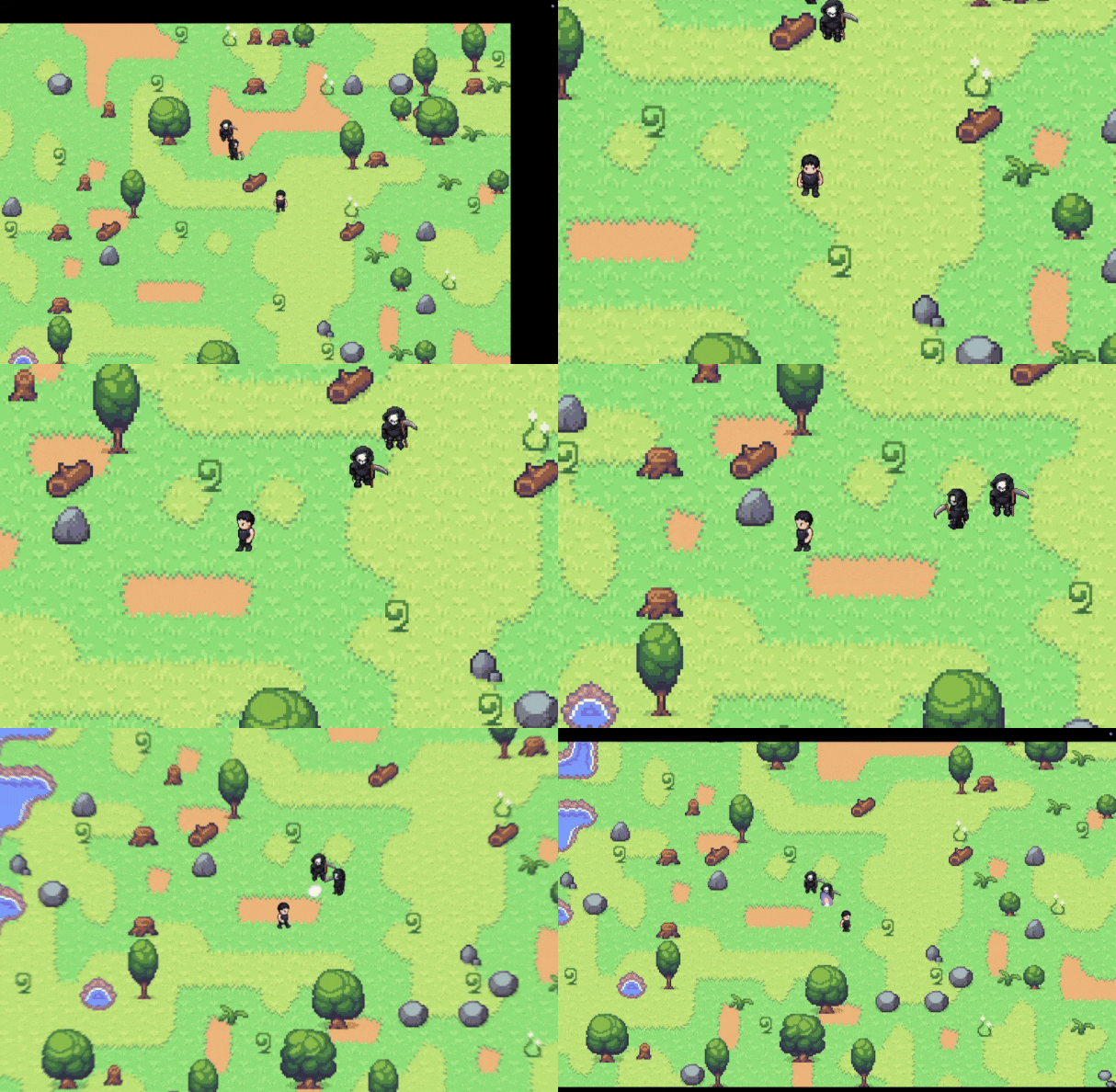
By the end of this chapter, you’ll have enemies that follow and attack your player.
Prerequisites: This is Chapter 7 of our Bevy tutorial series. Join our community for updates on new releases. Before starting, complete Chapter 1: Let There Be a Player, Chapter 2: Let There Be a World, Chapter 3: Let The Data Flow, Chapter 4: Let There Be Collisions, Chapter 5: Let There Be Pickups, and Chapter 6: Let There Be Particles, or clone the Chapter 6 code from this repository to follow along.
What Makes an Enemy Different from a Player?
Your player character moves, animates, collides with objects, and attacks. Now you want enemies do almost the same things expect for decision making.
Players make decisions through keyboard input. You press ↑, the character walks up. You press Ctrl, they attack. The input system reads your keypresses and sets components like Velocity and CharacterState.
Enemies need to make the same decisions, but automatically. Instead of reading a keyboard, they read the game world. “Where is the player? Am I close enough to attack? Which direction should I face?”
Both players and enemies need to:
- Move around the world
- Animate based on state
- Collide with walls and objects
- Attack with magical powers
The only difference is who decides what to do. For players, you decide. For enemies, AI decides. But once the decision is made, the rest is identical. Hence can we re-use the code we have written for player for enemy? Let’s find out.
Thinking in Components
In Bevy’s ECS architecture, entities are just IDs. Components are the data. Systems are the logic. This separation lets us build systems that work on any entity with the right components.
Your player entity has these components:
Player(marker)Transform(position)Velocity(movement)CharacterState(Idle, Walking, etc.)Facing(direction)AnimationController(sprite animation)Collider(physics)
An enemy entity needs most of the same components. The key insight: systems like apply_velocity, validate_movement, and animate_characters don’t care whether an entity is a player or enemy. They just process components.

Creating the Enemy Module
Create a new folder src/enemy with the following structure:
src/
├── enemy/
│   ├── mod.rs
│   ├── components.rs
│   ├── ai.rs
│   ├── combat.rs
│   └── spawn.rs
Enemy Components
We need three components to define enemy behavior. The Enemy marker identifies which entities are enemies. The EnemyCombat component gives them attack capabilities. The AIBehavior component controls their decision-making.
Create src/enemy/components.rs:
// src/enemy/components.rs
use crate::combat::PowerType;
use bevy::prelude::*;

/// Marker component for enemy entities
#[derive(Component)]
pub struct Enemy;

/// Combat capabilities for enemies
#[derive(Component)]
pub struct EnemyCombat {
    pub power_type: PowerType,
    pub cooldown: Timer,
}

impl Default for EnemyCombat {
    fn default() -> Self {
        Self {
            power_type: PowerType::Shadow, // Graveyard reaper uses shadow magic
            cooldown: Timer::from_seconds(2.0, TimerMode::Once), // Slower than player
        }
    }
}

impl EnemyCombat {
    pub fn new(power_type: PowerType, cooldown_seconds: f32) -> Self {
        Self {
            power_type,
            cooldown: Timer::from_seconds(cooldown_seconds, TimerMode::Once),
        }
    }
}

/// AI behavior state for enemies
#[derive(Component)]
pub struct AIBehavior {
    pub attack_range: f32,
    pub detection_range: f32,
}

impl Default for AIBehavior {
    fn default() -> Self {
        Self {
            attack_range: 150.0,    // Stop and attack within this range
            detection_range: 500.0, // Start following player within this range
        }
    }
}

impl AIBehavior {
    pub fn new(attack_range: f32, detection_range: f32) -> Self {
        Self {
            attack_range,
            detection_range,
        }
    }
}
What’s happening here?
The Enemy component is just a marker. It has no data, it just tags entities as enemies so systems can query for them.
EnemyCombat stores the enemy’s attack capabilities. The power_type determines what kind of projectile they fire (Shadow magic for our graveyard reaper). The cooldown timer prevents them from attacking every frame.
AIBehavior defines two ranges. The detection_range is how far away the enemy can “see” the player. The attack_range is how close they need to be before they stop moving and start attacking.
Why use Default?
The Default trait lets us spawn enemies quickly without specifying every field. We can call EnemyCombat::default() to get sensible starting values, then customize specific enemies with EnemyCombat::new() if needed.
Making Enemies Follow You
Now for the interesting part. We need a system that makes enemies track and follow the player.
Simple, move enemies directly toward the player? But what if there’s a tree in the way? The enemy walks into the obstacle and gets stuck.
We need pathfinding, the ability to find a route around obstacles. The industry-standard solution is the A* (“A-star”) algorithm.
Understanding A* Pathfinding
A* is a pathfinding algorithm that finds the shortest path between two points on a grid. It’s used everywhere in games, robotics, GPS navigation because it’s both efficient and guaranteed to find the shortest path.
A* explores the grid by calculating a score for each cell. A cell is a single square in the grid (like a tile in your game world). Cost here refers to how expensive it is to travel somewhere.
- g-cost: Actual distance traveled from start to this cell
- h-cost: Heuristic - Estimated distance from this cell to goal
- f-cost: Total cost - g + h (total estimated cost if we take this path)
The algorithm always explores the cell with the lowest f-cost first. This makes it “greedy” (always picking what looks best) but informed (using the heuristic to guide the search).
A* Pathfinding
The green cell is where the enemy starts, and the red cell is the player’s position. Black obstacles block the way, forcing the algorithm to navigate around them.
As A* explores, it marks cells in light blue (candidates to check next) and pink (already checked and ruled out). The dark blue cell shows what A* is currently examining, and once the path is found, it lights up in yellow.
Notice how the algorithm doesn’t waste time exploring cells that are obviously far from the goal, it intelligently prioritizes the most promising directions!
Adding the Pathfinding Crate
We’ll use the pathfinding crate for the A* algorithm.
Update your Cargo.toml:
[dependencies]
bevy = "0.18"
bevy_procedural_tilemaps = "0.2.0"
bevy_common_assets = { version = "0.15.0-rc.1", features = ["ron"] }
serde = { version = "1.0", features = ["derive"] }
rand = "0.8"
pathfinding = "4.9"  # Add this line
Now that we have the pathfinding algorithm, we need to build the infrastructure to use it. This involves three pieces:
- EnemyPath Component: Stores the calculated path and tracks which waypoint the enemy is currently moving toward
- CollisionMap Methods: Extends our collision system with pathfinding capabilities
- AI System: Uses both to make enemies intelligently navigate to the player
Let’s build each piece step by step.
What are waypoints?
Waypoints are like breadcrumbs along a path. Instead of storing “move 3 units north, then 2 units east,” we store actual positions like [(100, 50), (150, 50), (150, 100)]. The enemy moves toward the first waypoint, and when it gets close enough (16 units), it advances to the next one. This makes pathfinding flexible—waypoints can adapt to any terrain shape.
How Waypoints Work
The enemy (green) follows each waypoint in sequence. When it gets within 16 pixels of the current waypoint, it moves to the next one. Eventually it navigates the path to reach the player (red)!
The EnemyPath Component
So let’s create an EnemyPath component that caches the waypoints, tracks the current position along the path, and manages a recalculation timer.
Update src/enemy/components.rs to add this at the end:
// src/enemy/components.rs
// Add this after the AIBehavior implementation

/// Cached path for enemy navigation
#[derive(Component, Default)]
pub struct EnemyPath {
    /// Waypoints in world coordinates
    pub waypoints: Vec<Vec2>,
    /// Current waypoint index
    pub current_index: usize,
    /// Timer for path recalculation
    pub recalc_timer: f32,
}

impl EnemyPath {
    /// Distance threshold to consider a waypoint reached
    pub const WAYPOINT_THRESHOLD: f32 = 16.0;
    /// How often to recalculate path (seconds)
    pub const RECALC_INTERVAL: f32 = 0.5;

    /// Get current waypoint position
    pub fn current_waypoint(&self) -> Option<Vec2> {
        self.waypoints.get(self.current_index).copied()
    }

    /// Advance to next waypoint, returns true if path completed
    pub fn advance(&mut self) -> bool {
        self.current_index += 1;
        self.current_index >= self.waypoints.len()
    }

    /// Set a new path (skips first waypoint since it's the starting position)
    pub fn set_path(&mut self, waypoints: Vec<Vec2>) {
        // Skip waypoint 0 - it's the enemy's current position
        // This prevents jitter from briefly facing backwards
        let new_waypoints = if waypoints.len() > 1 {
            waypoints[1..].to_vec()
        } else {
            waypoints
        };

        // If we have an existing path, check if new path is similar
        // This prevents flickering when paths are recalculated
        if let Some(current_target) = self.current_waypoint() {
            if let Some(new_first) = new_waypoints.first() {
                // If new first waypoint is close to our current target,
                // keep the current path - we're already heading the right way
                if current_target.distance(*new_first) < Self::WAYPOINT_THRESHOLD * 1.5 {
                    return;
                }
            }
        }

        self.waypoints = new_waypoints;
        self.current_index = 0;
    }

    /// Check if we have a valid path
    pub fn has_path(&self) -> bool {
        !self.waypoints.is_empty() && self.current_index < self.waypoints.len()
    }
}
Let’s break down each piece:
waypoints: Stores the path as a vector of world positions. Once we calculate a path, we cache it here.current_index: Tracks which waypoint we’re heading toward. When we reach waypoint 0, we increment to waypoint 1, etc.recalc_timer: Counts down from 0.5 seconds. When it hits zero, we recalculate the path (in case the player moved).current_waypoint(): Returns the waypoint we’re currently heading toward (or None if we’ve completed the path).advance(): Moves to the next waypoint, returns true if we’ve completed the entire path.set_path(): Stores a new path with smart optimizations:- Skips waypoint 0 (the enemy’s current position) to avoid jitter
- Checks if the new path is similar to the current one - if so, keeps the existing path to reduce flickering
has_path(): Returns true if we have a valid, incomplete path to follow.
Why cache paths?
Running A* every frame would slow down the game. By recalculating every 0.5 seconds, we get smooth movement with minimal performance cost.
Why have a waypoint threshold?
Due to movement speed and frame timing, an enemy might never land exactly on a waypoint. The 16-unit threshold lets us consider it “reached” when close enough.
Now that we can store paths, we need to calculate them. But who does the pathfinding? The CollisionMap!
Why does CollisionMap do pathfinding? Shouldn’t the enemy figure out its own path?
Good question! The CollisionMap already knows which tiles are walkable and which aren’t, it has all the terrain data. Rather than duplicating this knowledge in the enemy AI, we extend CollisionMap with pathfinding methods. This way:
- Enemies just ask: “Give me a path to position X”
- CollisionMap responds: “Here’s the list of waypoints to get there”
This keeps our code clean and follows the principle: the component with the data provides the operations on that data.
Extending CollisionMap for Pathfinding
Our collision map knows about walkable tiles, but it doesn’t know how to find a path through them. We need to:
- Get valid neighboring cells (ensuring diagonal moves don’t cut corners through walls)
- Find the nearest walkable tile if the target is blocked
- Run A* pathfinding to calculate the optimal path
What does “don’t cut corners” mean?
Imagine two walls meeting at a corner diagonally. Without proper checks, an enemy could move diagonally through that gap, which looks like walking through walls! We prevent this by only allowing diagonal movement when both adjacent cardinal cells are also walkable.
  ┌───┬───┐
  │   │ W │  W = Wall
  ├───┼───┤
  │ W │   │  Can't cut diagonally!
  └───┴───┘
So let’s add these three methods to CollisionMap that work together to provide intelligent pathfinding.
Open src/collision/map.rs and add these methods at the end of the impl CollisionMap block:
First, add the import at the top of src/collision/map.rs:
// src/collision/map.rs
use pathfinding::prelude::astar;
Now add these methods at the end of the impl CollisionMap block:
// src/collision/map.rs
// Add at the end of impl CollisionMap, before the closing brace

    /// Get walkable neighboring grid cells (8 directions)
    /// Diagonal movement only allowed if both adjacent cardinals are clear
    pub fn get_neighbors(&self, pos: IVec2) -> Vec<IVec2> {
        let mut neighbors = Vec::new();

        // Cardinal directions (always allowed if walkable)
        let cardinals = [
            IVec2::new(0, 1), IVec2::new(0, -1), IVec2::new(-1, 0), IVec2::new(1, 0),
        ];

        for dir in cardinals {
            let neighbor = pos + dir;
            if self.is_walkable(neighbor.x, neighbor.y) {
                neighbors.push(neighbor);
            }
        }

        // Diagonal directions - only if both adjacent cardinals are clear
        // This prevents corner-cutting through diagonal walls
        let diagonals = [
            (IVec2::new(-1, 1), IVec2::new(-1, 0), IVec2::new(0, 1)),   // Up-Left
            (IVec2::new(1, 1), IVec2::new(1, 0), IVec2::new(0, 1)),     // Up-Right
            (IVec2::new(-1, -1), IVec2::new(-1, 0), IVec2::new(0, -1)), // Down-Left
            (IVec2::new(1, -1), IVec2::new(1, 0), IVec2::new(0, -1)),   // Down-Right
        ];

        for (diagonal, adj1, adj2) in diagonals {
            let diag_pos = pos + diagonal;
            let adj1_pos = pos + adj1;
            let adj2_pos = pos + adj2;

            // Only allow diagonal if destination AND both adjacent cells are walkable
            if self.is_walkable(diag_pos.x, diag_pos.y)
                && self.is_walkable(adj1_pos.x, adj1_pos.y)
                && self.is_walkable(adj2_pos.x, adj2_pos.y)
            {
                neighbors.push(diag_pos);
            }
        }

        neighbors
    }

    /// Find path using A* algorithm
    pub fn find_path(&self, start: Vec2, goal: Vec2) -> Option<Vec<Vec2>> {
        use pathfinding::prelude::astar;

        let start_grid = self.world_to_grid(start);
        let goal_grid = self.world_to_grid(goal);

        if !self.is_walkable(start_grid.x, start_grid.y) {
            return None;
        }

        let actual_goal = if self.is_walkable(goal_grid.x, goal_grid.y) {
            goal_grid
        } else {
            self.find_nearest_walkable(goal_grid)?
        };

        let result = astar(
            &start_grid,
            |pos| {
                let pos = *pos;
                self.get_neighbors(pos).into_iter().map(move |n| {
                    let cost = if (n.x - pos.x).abs() + (n.y - pos.y).abs() == 2 {
                        14u32 // Diagonal
                    } else {
                        10u32 // Cardinal
                    };
                    (n, cost)
                })
            },
            |pos| {
                let dx = (pos.x - actual_goal.x).abs();
                let dy = (pos.y - actual_goal.y).abs();
                ((dx + dy) * 10) as u32
            },
            |pos| *pos == actual_goal,
        );

        result.map(|(path, _cost)| {
            path.into_iter().map(|p| self.grid_to_world(p.x, p.y)).collect()
        })
    }

    /// Find nearest walkable cell
    pub fn find_nearest_walkable(&self, pos: IVec2) -> Option<IVec2> {
        for radius in 1i32..10 {
            for dx in -radius..=radius {
                for dy in -radius..=radius {
                    if dx.abs() == radius || dy.abs() == radius {
                        let check = IVec2::new(pos.x + dx, pos.y + dy);
                        if self.is_walkable(check.x, check.y) {
                            return Some(check);
                        }
                    }
                }
            }
        }
        None
    }

    /// Find nearest position where a circle of the given radius is fully clear.
    /// Searches expanding rings up to 20 tiles from the given world position.
    /// Returns a world-space position (tile center) or None if nothing found.
    pub fn find_nearest_clear_position(&self, world_pos: Vec2, radius: f32) -> Option<Vec2> {
        let grid_pos = self.world_to_grid(world_pos);

        for ring in 0i32..20 {
            for dx in -ring..=ring {
                for dy in -ring..=ring {
                    if ring > 0 && dx.abs() != ring && dy.abs() != ring {
                        continue; // Only check the ring perimeter
                    }
                    let candidate_grid = IVec2::new(grid_pos.x + dx, grid_pos.y + dy);
                    let candidate_world = self.grid_to_world(candidate_grid.x, candidate_grid.y);
                    if self.is_circle_clear(candidate_world, radius) {
                        return Some(candidate_world);
                    }
                }
            }
        }
        None
    }
Let’s break down the pathfinding code:
1. Neighbor Detection (get_neighbors):
- First checks all 4 cardinal directions (up/down/left/right)
- Then checks all 4 diagonal directions only if both adjacent cardinals are walkable
- This prevents enemies from “cutting corners” through diagonal walls
2. Nearest Walkable Search (find_nearest_walkable):
- Uses a spiral search pattern starting from the target
- Checks increasingly larger squares until it finds a walkable tile
- Returns None if nothing found within 10 tiles (player might be unreachable)
2b. Nearest Clear Position (find_nearest_clear_position):
- Like
find_nearest_walkable, but validates the full collider circle at each candidate, not just the tile type - Used for spawning, where we need to guarantee the entity won’t overlap any obstacle after placement
- Searches up to 20 tiles and returns a world-space position ready to use
3. A* Pathfinding (find_path):
- Converts world positions to grid coordinates
- Validates start position; if goal is blocked, finds nearest walkable alternative
- Runs A* algorithm using:
- Successors: Get neighbors with movement cost (10 for cardinal, 14 for diagonal)
- Heuristic: Manhattan distance estimate to goal
- Success: Checks if the current position is the goal
- Converts resulting grid path back to world coordinates
Understanding the astar Function
The A* function doesn’t care if you’re navigating a dungeon, flying a spaceship, or routing a delivery truck, it just needs to know “what positions exist” (nodes) and “how expensive is it to move between them” (costs).
Hence it’s just a generic function that works with any node type N and cost type C. Node in our situation, is a position on the board where the enemy can stand (in our case, grid coordinates like (5, 3))
// Pseudo code, don't use
pub fn astar<...>(
    start: &N,
    successors: FN,
    heuristic: FH,
    success: FS,
) -> Option<(Vec<N>, C)>
What matters are the four parameters:
start: &N- Enemy’s starting positionsuccessors: FN- A function that answers “where can I move from here?” It helps us know from the enemy’s current tile, which adjacent tiles can it walk to and how much does each move cost?heuristic: FH- A function that guesses distance to target or “how many tiles away is the player from here?”. It helps enemy prioritize which direction to explore first.success: FS- A function that checks “are we there yet?”. It returns true when the enemy has reached the player’s position.
The function returns Option<(Vec<N>, C)>:
Some((path, cost))A list of grid positions the enemy should walk through to reach the player, plus the total cost.Noneif no path exists or player is completely blocked off by obstacles, enemy can’t reach them.
Now let’s see how we provide these functions using closures:
Understanding Closures in the A* Implementation:
You might notice the astar function looks a bit odd, it takes closures (anonymous functions) as arguments. This is a powerful Rust pattern called higher-order functions.
// Pseudo code, don't use
let result = astar(
    &start_grid,              // Starting position
    |pos| { /* closure 1 */ },  // How to get neighbors and costs
    |pos| { /* closure 2 */ },  // How to estimate distance to goal
    |pos| { /* closure 3 */ },  // How to check if we reached the goal
);
Why closures?
The pathfinding crate’s astar function is generic - it works for ANY type of pathfinding problem (chess moves, graph traversal, tile grids, etc.). By accepting closures, it lets YOU define:
- What counts as a “neighbor” (straight lines only? diagonals too? teleportation?)
- What the movement costs are (flat terrain? hills?)
- How to estimate distance (Manhattan? Euclidean?)
- What the goal condition is
How do closures capture data?
Notice that the closures reference self and actual_goal , variables from the outer scope. Rust closures can “capture” these variables:
// Pseudo code don't use
|pos| {
    let pos = *pos;
    self.get_neighbors(pos)  // Uses 'self' from outer scope!
        .into_iter()
        .map(move |n| {
            // Calculate cost based on movement type
            let cost = if (n.x - pos.x).abs() + (n.y - pos.y).abs() == 2 {
                14u32  // Diagonal movement
            } else {
                10u32  // Cardinal movement
            };
            (n, cost)
    })
 }
What’s the move keyword?
In the inner closure (the one with .map(move |n| ...)), the move keyword forces the closure to take ownership of the captured variable pos. Without move, the closure would borrow pos, but since we’re returning this closure from .map(), it needs to own its data. Think of it like: “This closure is leaving home, so it needs to pack its own copy of pos.”
How does borrowing work with self.get_neighbors?
Great question! When the closure captures self, it’s actually borrowing it:
- The outer closure borrows
selfimmutably (just reading from it) self.get_neighbors(pos)only needs to read the collision map data- The
astarfunction promises to only call the closure while we’re in thefind_pathmethod - No ownership is transferred, so no borrowing rules are broken!
The borrowing is temporary and safe because:
- We’re not trying to modify
self(immutable borrow is fine) - The closure only exists during the
astarcall, not after - Rust’s borrow checker verifies this at compile time
This closure is essentially a custom function that says: “For any position, here’s how to find its neighbors and the cost to reach them.”
The AI System with Pathfinding
Now we can implement AI that uses pathfinding.
We need enemies to intelligently pursue the player by:
- Detecting when the player is in range
- Using pathfinding to navigate around obstacles
- Stopping to attack when close enough
- Handling edge cases (player too far, pathfinding fails, etc.)
- Preventing jitter and oscillation with smart state transitions
Build an AI system that manages three behavior states (idle, following, attacking) with smooth transitions between them.
Create src/enemy/ai.rs:
// src/enemy/ai.rs
use super::components::{AIBehavior, Enemy, EnemyPath};
use crate::characters::{
    config::CharacterEntry,
    facing::Facing,
    input::Player,
    physics::{Velocity, calculate_velocity},
    state::CharacterState,
};
use crate::collision::CollisionMap;
use bevy::prelude::*;

/// AI system that makes enemies follow the player using A* pathfinding
pub fn enemy_follow_player(
    time: Res<Time>,
    collision_map: Option<Res<CollisionMap>>,
    mut enemy_query: Query<
        (
            &Transform,
            &mut CharacterState,
            &mut Velocity,
            &mut Facing,
            &CharacterEntry,
            &AIBehavior,
            &mut EnemyPath,
        ),
        With<Enemy>,
    >,
    player_query: Query<&Transform, With<Player>>,
) {
    let Ok(player_transform) = player_query.single() else {
        return;
    };

    let Some(collision_map) = collision_map else {
        return;
    };

    let player_pos = player_transform.translation.truncate();
    let delta = time.delta_secs();

    for (enemy_transform, mut state, mut velocity, mut facing, character, ai, mut path) in
        enemy_query.iter_mut()
    {
        let enemy_pos = enemy_transform.translation.truncate();
        let to_player = player_pos - enemy_pos;
        let distance = to_player.length();

        // Outside detection range - go idle
        if distance > ai.detection_range {
            if *state != CharacterState::Idle {
                *state = CharacterState::Idle;
            }
            *velocity = Velocity::ZERO;
            continue;
        }

        // Within attack range - stop and attack
        // Use hysteresis: different threshold for staying vs entering attack mode
        // This prevents oscillation at the boundary
        let attack_threshold = if *state == CharacterState::Idle {
            ai.attack_range + 20.0 // Stay in attack mode even if player moves slightly away
        } else {
            ai.attack_range // Enter attack mode at normal range
        };

        if distance <= attack_threshold {
            if *state != CharacterState::Idle {
                *state = CharacterState::Idle;
            }
            *velocity = Velocity::ZERO;

            // Face the player while attacking
            let direction = to_player.normalize_or_zero();
            if direction != Vec2::ZERO {
                let new_facing = Facing::from_velocity(direction);
                if *facing != new_facing {
                    *facing = new_facing;
                }
            }
            continue;
        }

        // Need to move toward player - use pathfinding
        path.recalc_timer -= delta;

        // Recalculate path if we don't have one
        if !path.has_path() {
            if let Some(waypoints) = collision_map.find_path(enemy_pos, player_pos) {
                path.set_path(waypoints);
                path.recalc_timer = EnemyPath::RECALC_INTERVAL;
            }
        } else if path.recalc_timer <= 0.0 {
            // Periodically update existing path
            path.recalc_timer = EnemyPath::RECALC_INTERVAL;

            if let Some(waypoints) = collision_map.find_path(enemy_pos, player_pos) {
                path.set_path(waypoints);
            }
        }

        // Follow current waypoint
        if let Some(waypoint) = path.current_waypoint() {
            let to_waypoint = waypoint - enemy_pos;
            let waypoint_distance = to_waypoint.length();

            // Check if we reached the waypoint
            if waypoint_distance < EnemyPath::WAYPOINT_THRESHOLD {
                path.advance();
            }

            // Recalculate direction for current waypoint (might have advanced)
            if let Some(current_wp) = path.current_waypoint() {
                let to_waypoint = current_wp - enemy_pos;
                let direction = to_waypoint.normalize_or_zero();

            // Update state
            if *state != CharacterState::Walking {
                *state = CharacterState::Walking;
            }

            // Update facing
            if direction != Vec2::ZERO {
                let new_facing = Facing::from_velocity(direction);
                if *facing != new_facing {
                    *facing = new_facing;
                }
            }

                // Calculate velocity toward waypoint
                *velocity = calculate_velocity(*state, direction, character);
            }
        } else {
            // No path available - fallback to direct movement
            let direction = to_player.normalize_or_zero();

            if *state != CharacterState::Walking {
                *state = CharacterState::Walking;
            }

            if direction != Vec2::ZERO {
                let new_facing = Facing::from_velocity(direction);
                if *facing != new_facing {
                    *facing = new_facing;
                }
            }

            *velocity = calculate_velocity(*state, direction, character);
        }
    }
}
How does this work?
The query fetches all enemies with their path component. We also get the CollisionMap resource and player’s position.
For each enemy, we check three ranges:
- Too far (beyond detection range): Go idle
- In attack range: Stop moving, face player
- Between ranges: Use pathfinding to approach
Attack range hysteresis: We use different thresholds for entering vs staying in attack mode:
- Enter attack:
distance <= attack_range(150) - Stay attacking:
distance <= attack_range + 20(170)
This prevents oscillation, a buggy behavior where the enemy rapidly flickers between states. Imagine the player is exactly 150 units away (the attack range). The enemy enters attack mode, but as soon as it stops moving, the distance might increase to 151 units, triggering follow mode again. This causes the enemy to jitter back and forth between “attack” and “follow” dozens of times per second! By adding a buffer zone, the enemy must move further away (170 units) before switching back to following.
Path management: We separate path creation from path updates:
- No path → Create immediately and reset timer
- Have path, timer expired → Update periodically (every 0.5s)
This prevents the path from resetting mid-frame when enemies complete waypoints.
Path similarity check: Before replacing an existing path, we check if the new path’s first waypoint is close to our current target. If so, we keep the existing path since we’re already heading the right direction. This reduces flickering during periodic updates.
Skipping the first waypoint: A* includes the starting position as waypoint 0. If we don’t skip it, enemies briefly face backward (toward their own position) before turning to the actual destination. By skipping waypoint 0 in set_path(), enemies immediately move toward the first real destination.
Waypoint advancement: When we reach a waypoint, we call advance() and immediately recalculate the direction for the NEW current waypoint in the same frame. This prevents jitter from skipping frames between waypoints.
Fallback behavior: If pathfinding fails, we fall back to direct movement. This ensures enemies don’t get completely stuck.
Why check if state changed?
Bevy’s change detection tracks when components are modified. If we set *state = new_state every frame even when the value doesn’t change, Bevy thinks the state changed. This triggers systems that run on Changed<CharacterState>, like animation updates. By only updating when the value actually changes, we avoid unnecessary work.
Making Enemies Attack
Enemies can follow the player, but they need to attack. We’ll create a combat system that fires when enemies are in range and their cooldown is ready.
The combat system needs to:
- Tick the cooldown timer
- Check if the player is in attack range
- Fire a projectile when ready
- Reset the cooldown
Create src/enemy/combat.rs:
// src/enemy/combat.rs
use super::components::{AIBehavior, Enemy, EnemyCombat};
use crate::characters::input::Player;
use crate::combat::systems::spawn_projectile;
use bevy::prelude::*;

/// System that handles enemy attacks
pub fn enemy_attack(
    mut commands: Commands,
    time: Res<Time>,
    mut enemy_query: Query<(&GlobalTransform, &mut EnemyCombat, &AIBehavior), With<Enemy>>,
    player_query: Query<&Transform, With<Player>>,
) {
    let Ok(player_transform) = player_query.single() else {
        return;
    };

    for (enemy_transform, mut combat, ai) in enemy_query.iter_mut() {
        // Tick the cooldown timer
        combat.cooldown.tick(time.delta());

        let enemy_pos = enemy_transform.translation();
        let player_pos = player_transform.translation;

        // Calculate distance to player
        let distance = enemy_pos.distance(player_pos);

        // Attack if in range and cooldown is ready
        if distance <= ai.attack_range && combat.cooldown.elapsed() >= combat.cooldown.duration() {
            // Calculate direction to player
            let to_player = (player_pos - enemy_pos).normalize();
            let spawn_position = enemy_pos + to_player * 5.0;

            // Get visuals from power type (using actual direction to player)
            let visuals = combat.power_type.visuals(to_player);

            // Spawn projectile (reuse existing function!)
            spawn_projectile(&mut commands, spawn_position, combat.power_type, &visuals);

            // Reset cooldown for next attack
            combat.cooldown.reset();

            info!("Enemy fired {:?} projectile at player!", combat.power_type);
        }
    }
}
How does the attack system work?
Every frame, we tick each enemy’s cooldown timer. We check if elapsed() >= duration() to see if the cooldown is ready. This allows enemies to attack immediately when spawned (the timer starts in a finished state) and then every 2 seconds after.
We calculate the actual direction vector from enemy to player using (player_pos - enemy_pos).normalize(). This ensures projectiles always aim at the player’s current position, not just in a cardinal direction.
We check if the player is within attack range. If both conditions are met (cooldown ready AND player in range), we fire a projectile toward the player and reset the cooldown.
The spawn_projectile function is the same one the player uses. We made it public in combat/systems.rs so both players and enemies can call it. This is code reuse at its best.
Fixing Player Spawning
Before we spawn enemies, we need to fix a critical bug in how the player spawn. Right now, the player spawns at (0, 0) during Startup, before the collision map exists. This means the player might spawn on an obstacle (rock, tree, water) and get stuck!
To prevent this, let’s use a validate-then-spawn pattern:
- Load character assets →
Startup - Wait for collision map →
Update(run condition) - Validate position → Check
is_circle_clear - Spawn at valid position
This ensures characters never spawn on obstacles.
Let’s update src/characters/spawn.rs. We’ll split the old system into two cleaner functions:
First, add these imports at the top of the file:
// src/characters/spawn.rs
use crate::collision::CollisionMapBuilt; // Add this line
use crate::config::player::COLLIDER_RADIUS; // Add this line
use crate::collision::CollisionMap; // Add this line
Remove these old functions:
//DELETE spawn_player
//DELETE initialize_player_character
Add these new functions:
// src/characters/spawn.rs
// Update the resource name at the top of the file
/// Resource to track if player has been spawned (prevents spawning multiple times)
#[derive(Resource, Default, PartialEq, Eq)]
pub struct PlayerSpawned(pub bool);

/// Get a valid spawn position, checking collision map and adjusting if needed
fn get_valid_spawn_position(collision_map: &CollisionMap, desired_pos: Vec2) -> Vec2 {
    // Use the same radius as the runtime collision system
    if collision_map.is_circle_clear(desired_pos, COLLIDER_RADIUS) {
        return desired_pos;
    }

    // Find nearest position where the full collider circle is clear
    if let Some(clear_pos) = collision_map.find_nearest_clear_position(desired_pos, COLLIDER_RADIUS) {
        info!(
            "Adjusted player spawn from {:?} to {:?} (was on obstacle)",
            desired_pos, clear_pos
        );
        return clear_pos;
    }

    // Fallback to original
    warn!("Could not find walkable spawn position near {:?}", desired_pos);
    desired_pos
}

// Replace spawn_player with this
/// Load character assets at startup (before collision map is built)
pub fn load_character_assets(
    mut commands: Commands,
    asset_server: Res<AssetServer>,
    mut character_index: ResMut<CurrentCharacterIndex>,
) {
    // Load the characters list
    let characters_list_handle: Handle<CharactersList> =
        asset_server.load("characters/characters.ron");

    // Store the handle in a resource
    commands.insert_resource(CharactersListResource {
        handle: characters_list_handle,
    });

    // Initialize with first character
    character_index.index = 0;

    info!("Character assets loading started");
}

// Add this new function
/// Spawn player at a valid position AFTER collision map is built
pub fn spawn_player_at_valid_position(
    mut commands: Commands,
    asset_server: Res<AssetServer>,
    mut atlas_layouts: ResMut<Assets<TextureAtlasLayout>>,
    characters_lists: Res<Assets<CharactersList>>,
    character_index: Res<CurrentCharacterIndex>,
    characters_list_res: Option<Res<CharactersListResource>>,
    collision_map: Option<Res<CollisionMap>>,
    mut player_spawned: ResMut<PlayerSpawned>,
) {
    // Wait for collision map
    let Some(collision_map) = collision_map else {
        return;
    };

    // Wait for character list resource
    let Some(characters_list_res) = characters_list_res else {
        return;
    };

    // Get the character list asset
    let Some(characters_list) = characters_lists.get(&characters_list_res.handle) else {
        return;
    };

    if character_index.index >= characters_list.characters.len() {
        warn!("Invalid character index: {}", character_index.index);
        return;
    }

    let character_entry = &characters_list.characters[character_index.index];

    // Calculate valid spawn position
    let desired_pos = Vec2::new(0.0, 0.0);
    let valid_pos = get_valid_spawn_position(&collision_map, desired_pos);

    // Create sprite
    let texture = asset_server.load(&character_entry.texture_path);
    let layout = create_character_atlas_layout(&mut atlas_layouts, character_entry);
    let sprite = Sprite::from_atlas_image(texture, TextureAtlas { layout, index: 0 });

    // Spawn player with all components at valid position
    commands.spawn((
        Player,
        Transform::from_translation(Vec3::new(valid_pos.x, valid_pos.y, PLAYER_Z_POSITION))
            .with_scale(Vec3::splat(PLAYER_SCALE)),
        sprite,
        AnimationController::default(),
        CharacterState::default(),
        Velocity::default(),
        Facing::default(),
        Collider::default(),
        PlayerCombat::default(),
        AnimationTimer(Timer::from_seconds(
            DEFAULT_ANIMATION_FRAME_TIME,
            TimerMode::Repeating,
        )),
        character_entry.clone(),
    ));

    // Mark player as spawned
    player_spawned.0 = true;
    info!("Player spawned at validated position {:?}", valid_pos);
}
What changed?
- load_character_assets (Startup) - Only loads the asset, doesn’t spawn anything
- spawn_player_at_valid_position (Update) - Waits for collision map, validates position, then spawns with ALL components in one step
- get_valid_spawn_position - Shared helper that checks
is_circle_clear(not just single tile!)
Notice we use COLLIDER_RADIUS — the same constant the runtime collision system uses. This is important: if spawn validation checks a smaller radius than what the movement system enforces, an entity could pass the spawn check but still overlap an obstacle at runtime and get stuck. Using a single source of truth eliminates that mismatch. The fallback find_nearest_clear_position also validates the full circle, not just the tile type.
Updating the Plugin
Now update src/characters/mod.rs:
// src/characters/mod.rs
// Update imports
use spawn::PlayerSpawned; // Add this line
use crate::collision::CollisionMapBuilt; // Add this line

impl Plugin for CharactersPlugin {
    fn build(&self, app: &mut App) {
        app.add_plugins(RonAssetPlugin::<CharactersList>::new(&["characters.ron"]))
            .init_resource::<spawn::CurrentCharacterIndex>()
            .init_resource::<PlayerSpawned>() // Add this line
            // Load character assets at startup (before collision map)
            .add_systems(Startup, spawn::load_character_assets) // Change function name
            // Spawn player at valid position AFTER collision map is built
            // Add this
            .add_systems(
                Update,
                spawn::spawn_player_at_valid_position
                    .run_if(resource_equals(CollisionMapBuilt(true)))
                    .run_if(resource_equals(PlayerSpawned(false)))
                    .run_if(in_state(GameState::Playing)),
            )
            .add_systems(
                Update,
                (
                    input::handle_player_input,
                    spawn::switch_character,
                    input::update_jump_state,
                    animation::on_state_change_update_animation,
                    collider::validate_movement,
                    physics::apply_velocity,
                    rendering::update_player_depth,
                    animation::animations_playback,
                )
                    .chain()
                    .run_if(in_state(GameState::Playing)),
            );
    }
}
And one more fix in src/state/mod.rs - remove the old initialization from OnExit(Loading):
// src/state/mod.rs
.add_systems(OnExit(GameState::Loading),
    loading::despawn_loading_screen,
    // REMOVE: crate::characters::spawn::initialize_player_character,
)
Adding Enemy Configuration
Now, let’s add configuration constants for enemies in src/config.rs:
// src/config.rs
pub mod player {
    // ... existing player config ...
}

pub mod enemy {
    /// Z-position for enemy rendering (same as player for consistent layering)
    pub const ENEMY_Z_POSITION: f32 = 20.0;

    /// Visual scale of enemy sprites (same as player for consistency)
    pub const ENEMY_SCALE: f32 = 1.2;
} // Add this

pub mod pickup {
    // ... existing pickup config ...
}
// ... rest of config ...
We create a separate enemy module to keep enemy constants organized and avoid confusion with player constants.
Spawning Enemies
Now we need to actually create enemy entities in the world. We’ll write a spawn function that creates an enemy with all the necessary components, then a system that spawns test enemies - using the exact same pattern we just used for the player.
The spawn function needs to:
- Load the character configuration from characters.ron
- Create the sprite atlas
- Spawn an entity with all required components
Create src/enemy/spawn.rs:
// src/enemy/spawn.rs
use super::components::{AIBehavior, Enemy, EnemyCombat, EnemyPath};
use crate::characters::{
    animation::{AnimationController, AnimationTimer, DEFAULT_ANIMATION_FRAME_TIME},
    collider::Collider,
    config::{CharacterEntry, CharactersList},
    facing::Facing,
    physics::Velocity,
    spawn::CharactersListResource, // Add this line
    state::CharacterState,
};
use crate::collision::CollisionMap;
use crate::config::enemy::{ENEMY_SCALE, ENEMY_Z_POSITION};
use crate::config::player::COLLIDER_RADIUS;
use bevy::prelude::*;

/// Spawn an enemy at the given position
pub fn spawn_enemy(
    commands: &mut Commands,
    asset_server: &AssetServer,
    atlas_layouts: &mut ResMut<Assets<TextureAtlasLayout>>,
    characters_list: &CharactersList,
    position: Vec3,
    character_name: &str,
) -> Option<Entity> {
    // Find the character entry by name
    let character_entry = characters_list
        .characters
        .iter()
        .find(|c| c.name == character_name)?;

    // Create atlas layout
    let max_row = character_entry.calculate_max_animation_row();
    let layout = atlas_layouts.add(TextureAtlasLayout::from_grid(
        UVec2::splat(character_entry.tile_size),
        character_entry.atlas_columns as u32,
        (max_row + 1) as u32,
        None,
        None,
    ));

    // Load texture
    let texture = asset_server.load(&character_entry.texture_path);

    // Create sprite
    let sprite = Sprite::from_atlas_image(texture, TextureAtlas { layout, index: 0 });

    // Spawn enemy entity with all necessary components
    let entity = commands
        .spawn((
            Enemy,
            sprite,
            Transform::from_translation(position).with_scale(Vec3::splat(ENEMY_SCALE)),
            GlobalTransform::default(),
            AnimationController::default(),
            CharacterState::default(),
            Velocity::default(),
            Facing::default(),
            Collider::default(),
            EnemyCombat::default(),
            AIBehavior::default(),
            EnemyPath::default(),  // Add this line
            AnimationTimer(Timer::from_seconds(
                DEFAULT_ANIMATION_FRAME_TIME,
                TimerMode::Repeating,
            )),
            character_entry.clone(),
        ))
        .id();

    info!("Spawned enemy '{}' at {:?}", character_name, position);

     Some(entity)
}

/// Resource to track if enemies have been spawned
#[derive(Resource, Default, PartialEq, Eq)]
pub struct EnemiesSpawned(pub bool);

/// Validate and adjust spawn position to ensure it's on a walkable tile
fn get_valid_spawn_position(collision_map: &CollisionMap, desired_pos: Vec2) -> Vec2 {
    // Use the same radius as the runtime collision system
    if collision_map.is_circle_clear(desired_pos, COLLIDER_RADIUS) {
        return desired_pos;
    }

    // Find nearest position where the full collider circle is clear
    if let Some(clear_pos) = collision_map.find_nearest_clear_position(desired_pos, COLLIDER_RADIUS) {
        info!(
            "Adjusted spawn from {:?} to {:?} (was on obstacle)",
            desired_pos, clear_pos
        );
        return clear_pos;
    }

    // Fallback to original (shouldn't happen in a valid map)
    warn!("Could not find walkable spawn position near {:?}", desired_pos);
    desired_pos
}

/// System to spawn test enemies when collision map is ready
pub fn spawn_test_enemies(
    mut commands: Commands,
    asset_server: Res<AssetServer>,
    mut atlas_layouts: ResMut<Assets<TextureAtlasLayout>>,
    characters_lists: Res<Assets<CharactersList>>,
    characters_list_res: Option<Res<CharactersListResource>>, // Add this line
    collision_map: Option<Res<CollisionMap>>,
    mut enemies_spawned: ResMut<EnemiesSpawned>,
) {
    // Wait for collision map
    let Some(collision_map) = collision_map else {
        return;
    };

    // Wait for character list resource
    let Some(characters_list_res) = characters_list_res else {
        return;
    };

    // Get the character list asset
    let Some(characters_list) = characters_lists.get(&characters_list_res.handle) else {
        return;
    };

    // Define desired spawn positions
    let spawn_positions = [Vec2::new(200.0, 0.0), Vec2::new(-200.0, 100.0)];

    for desired_pos in spawn_positions {
        // Validate position against collision map
        let valid_pos = get_valid_spawn_position(&collision_map, desired_pos);

        spawn_enemy(
            &mut commands,
            &asset_server,
            &mut atlas_layouts,
            characters_list,
            Vec3::new(valid_pos.x, valid_pos.y, ENEMY_Z_POSITION),
            "graveyard_reaper",
        );
    }

    // Mark enemies as spawned so this system doesn't run again
    enemies_spawned.0 = true;
    info!("Enemies spawned with validated positions");
}
What’s happening in spawn_enemy?
This function follows the same pattern as the player spawn system. Both players and enemies need the same components for movement, animation, and collision.
Both player and enemy spawning now follow the same “validate-then-spawn” approach:
- Wait for collision map (run condition:
CollisionMapBuilt(true)) - Check spawn position (using
is_circle_clearwithCOLLIDER_RADIUS) - Find nearest clear position if blocked (using
find_nearest_clear_position, which validates the full collider circle) - Spawn with all components (once valid position is determined)
The key differences between player and enemy entities are:
- Marker component:
PlayervsEnemy - Behavior components:
PlayerCombatvsEnemyCombat+AIBehavior - Context-specific: Player gets inventory, enemies get pathfinding
Notice how we reuse CharacterEntry from characters.ron. The “graveyard_reaper” character we defined in Chapter 3 works perfectly for enemies. Same sprite system, same animation definitions, zero duplication.
Why return Option<Entity>?
The find() call might fail if the character name doesn’t exist in characters.ron. Returning Option<Entity> lets the caller handle this gracefully. If the character is found, we return Some(entity_id). If not, we return None.
The Enemy Plugin
Now we need to wire everything together into a plugin. The plugin will register all our enemy systems and schedule them to run at the right time.
Create src/enemy/mod.rs:
// src/enemy/mod.rs
pub mod ai;
pub mod combat;
pub mod components;
pub mod spawn;

use crate::collision::CollisionMapBuilt;
use crate::state::GameState;
use bevy::prelude::*;
use spawn::EnemiesSpawned;

pub use components::{AIBehavior, Enemy, EnemyCombat};
pub use spawn::spawn_enemy;

pub struct EnemyPlugin;

impl Plugin for EnemyPlugin {
    fn build(&self, app: &mut App) {
        app
            .init_resource::<EnemiesSpawned>()
            // Spawn enemies AFTER collision map is ready (prevents spawning on obstacles)
            .add_systems(
                Update,
                spawn::spawn_test_enemies
                    .run_if(resource_equals(CollisionMapBuilt(true)))
                    .run_if(resource_equals(EnemiesSpawned(false)))
                    .run_if(in_state(GameState::Playing)),
            )
            // Enemy AI and combat systems
            .add_systems(
                Update,
                (ai::enemy_follow_player, combat::enemy_attack)
                    .chain()
                    .run_if(in_state(GameState::Playing)),
            );
    }
}
How does the plugin work?
We use run conditions to control when spawn_test_enemies executes:
CollisionMapBuilt(true)- collision map must exist before validating spawn positionsEnemiesSpawned(false)- spawns only once (resource tracks spawn state)in_state(GameState::Playing)- only spawns during actual gameplay
This ensures enemies spawn at validated positions AFTER the collision map is ready, preventing them from spawning on obstacles.
The AI and combat systems run every frame during Playing state. We chain them together so AI runs first (updating positions), then combat runs (firing projectiles).
Also, our enemy combat system needs to call spawn_projectile, but it’s currently private to the combat module. We need to make two changes: make the systems module public, and export the spawn_projectile function.
Open src/combat/mod.rs and update it:
// src/combat/mod.rs
mod player_combat;
mod power_type;
pub mod systems; // Line update alert: Make module public

pub use player_combat::PlayerCombat;
pub use power_type::{PowerType, PowerVisuals};
pub use systems::{debug_switch_power, handle_power_input, spawn_projectile}; // Line update alert: Export spawn_projectile
Then open src/combat/systems.rs and make the spawn_projectile function public:
// src/combat/systems.rs
// Find this function and add 'pub' keyword
pub fn spawn_projectile( // Line update alert: Add 'pub' keyword
    commands: &mut Commands,
    position: Vec3,
    power_type: PowerType,
    visuals: &PowerVisuals,
) {
    // ... rest of the function
}
Now both players and enemies can call spawn_projectile from outside the combat module.
Fixing Enemy Depth Sorting
There’s one more issue to address. Remember in Chapter 5 when we implemented depth sorting for the player? The player’s Z position updates based on Y position, so they render correctly behind or in front of objects.
Enemies need the same treatment. Right now, they spawn with a static Z position and never update. This means an enemy standing at the bottom of the screen (low Y) might render behind a tree at the top of the screen (high Y), which looks wrong.
The good news? We already have the depth sorting logic. We just need to make it work for all characters, not just the player.
Open src/characters/rendering.rs and update it:
// src/characters/rendering.rs
use bevy::prelude::*;

use crate::characters::state::CharacterState; // Line update alert: Change from Player to CharacterState
use crate::config::map::{GRID_Y, TILE_SIZE};
use crate::config::player::PLAYER_SCALE;

/// Z-depth constants for proper layering.
/// The tilemap uses `with_z_offset_from_y(true)` which assigns Z based on Y position.
/// We need to match this formula for all characters (player and enemies). // Line update alert
const NODE_SIZE_Z: f32 = 1.0;  // Same as tilemap generator
const CHARACTER_BASE_Z: f32 = 4.0;  // Match props layer Z range // Line update alert
const CHARACTER_Z_OFFSET: f32 = 0.5;  // Small offset to stay above ground props // Line update alert

pub fn update_character_depth( // Line update alert: Renamed from update_player_depth
    //Updated from PlayerState to CharacterState
    mut character_query: Query<&mut Transform, (With<CharacterState>, Changed<Transform>)>,
) {
    // Map dimensions for normalization
    let map_height = TILE_SIZE * GRID_Y as f32;
    let map_y0 = -TILE_SIZE * GRID_Y as f32 / 2.0;  // Map origin Y (centered)

    // Character sprite height for feet position calculation // Line update alert
    let character_sprite_height = 64.0 * PLAYER_SCALE; // Line update alert

    for mut transform in character_query.iter_mut() { // Line update alert
        let character_center_y = transform.translation.y; // Line update alert

        // Use character's FEET position for depth sorting (not center) // Line update alert
        let character_feet_y = character_center_y - (character_sprite_height / 2.0); // Line update alert

        // Normalize feet Y to [0, 1] across the grid height
        let t = ((character_feet_y - map_y0) / map_height).clamp(0.0, 1.0); // Line update alert

        // Y-to-Z formula:
        // Lower Y (bottom of screen) = higher t = lower Z offset = rendered in front
        // Higher Y (top of screen) = lower t = higher Z offset = rendered behind
        let character_z = CHARACTER_BASE_Z + NODE_SIZE_Z * (1.0 - t) + CHARACTER_Z_OFFSET; // Line update alert

        transform.translation.z = character_z; // Line update alert
    }
}
What changed?
We changed the query from With<Player> to With<CharacterState>. Since both players and enemies have the CharacterState component, this system now runs for all characters.
We also renamed the function and variables to reflect that it’s no longer player-specific.
Now update src/characters/mod.rs to use the new function name:
// src/characters/mod.rs
// Find the Update systems and update this line:
.add_systems(Update, (
    input::handle_player_input,
    spawn::switch_character,
    input::update_jump_state,
    animation::on_state_change_update_animation,
    collider::validate_movement,
    physics::apply_velocity,
    rendering::update_character_depth, // Line update alert: Renamed
    animation::animations_playback,
).chain().run_if(in_state(GameState::Playing)));
Why does this work?
Both players and enemies have the CharacterState component. By querying for With<CharacterState> instead of With<Player>, the depth sorting system automatically applies to all character entities.
The system uses Changed<Transform> to only recalculate Z-depth when entities move, keeping it efficient.
Preventing Entity Stacking
We have one more collision problem to solve. Right now, the validate_movement system only checks against the collision map (tiles and obstacles). It doesn’t check against other entities. This means:
- Enemies can stack on top of each other
- Enemies pass right through the player
We need entity-to-entity collision detection.
The Approach:
After validating against the collision map, we’ll check each entity against all other entities. If two entities overlap (their collision circles intersect), we push them apart.
Open src/characters/collider.rs and add this new system at the end:
// src/characters/collider.rs
// Add at the end of the file

/// Resolve collisions between entities (player and enemies)
/// Prevents entities from moving into each other
pub fn resolve_entity_collisions(
    mut query: Query<(Entity, &Transform, &mut Velocity, &Collider)>,
) {
    // Collect all entity positions first to avoid multiple mutable borrows
    let entities: Vec<_> = query
        .iter()
        .map(|(e, t, _, c)| (e, c.world_position(t), c.radius))
        .collect();

    // Check each entity against all others
    for (entity, transform, mut velocity, collider) in query.iter_mut() {
        // Skip if not moving
        if !velocity.is_moving() {
            continue;
        }

        let pos = collider.world_position(transform);
        let radius = collider.radius;

        for &(other_entity, other_pos, other_radius) in &entities {
            // Skip self
            if entity == other_entity {
                continue;
            }

            let delta = other_pos - pos;
            let distance = delta.length();
            let min_distance = radius + other_radius;

            // Check if entities are overlapping or very close
            if distance < min_distance * 1.1 {
                // Calculate the direction toward the other entity
                if distance > 0.01 {
                    let direction = delta / distance;

                    // Project velocity onto the direction toward the other entity
                    let velocity_toward = velocity.0.dot(direction);

                    // If moving toward the other entity, block that movement
                    if velocity_toward > 0.0 {
                        // Remove the component of velocity moving toward the other entity
                        velocity.0 -= direction * velocity_toward;
                    }
                }
            }
        }
    }
}
How does this work?
This uses vector projection to block movement toward other entities:
- Collect positions first - Store all entity positions to avoid borrowing issues
- Skip stationary entities - Only check moving entities
- Check proximity - If entities are within
1.1 * (radius1 + radius2), they’re close enough to block - Project velocity - Use dot product to find how much velocity points toward the other entity
- Remove that component - Subtract the “toward” velocity, leaving only tangential movement
Why vector projection?
Instead of pushing entities apart (which feels jarring), we let them slide past each other. If an enemy walks toward the player, the component of velocity moving directly toward the player is removed, but sideways velocity remains. This creates smooth “sliding” collisions.
Example:
- Enemy moving diagonally toward player: ↗
- After blocking: Enemy slides sideways past player: →
This feels natural and prevents the jittery pushback effect.
Why modify velocity instead of directly moving entities?
Modifying velocity keeps physics consistent. The pushback force is applied as acceleration, then apply_velocity moves the entity. This ensures collision response feels smooth and natural.
Now add this system to the chain in src/characters/mod.rs:
// src/characters/mod.rs
.add_systems(
    Update,
    (
        input::handle_player_input,
        spawn::switch_character,
        input::update_jump_state,
        animation::on_state_change_update_animation,
        collider::validate_movement,
        collider::resolve_entity_collisions, // NEW: Prevent entity stacking
        physics::apply_velocity,
        rendering::update_character_depth,
        animation::animations_playback,
    )
        .chain()
        .run_if(in_state(GameState::Playing)),
)
System order matters:
validate_movement    → Check vs tiles/obstacles
resolve_entity_collisions  → Check vs other entities
apply_velocity       → Actually move the character
Both collision checks happen BEFORE movement is applied. This prevents entities from getting stuck inside obstacles or each other.
Integrating the Enemy Module
Finally, let’s add the enemy module to our game. Open src/main.rs and add the module declaration and plugin:
// src/main.rs
mod camera;
mod characters;
mod collision;
mod combat;
mod config;
mod enemy; // Add this line
mod inventory;
mod map;
mod particles;
mod state;
Then add the plugin to your app:
// Inside main function of src/main.rs
fn main() {
    App::new()
        // ... existing plugins ...
        .add_plugins(combat::CombatPlugin)
        .add_plugins(enemy::EnemyPlugin) // Add this line
        .add_plugins(inventory::InventoryPlugin)
        // ... rest of the code ...
        .run();
}
Run your game:
cargo run
Optimizing Debug Builds
Community Tip: This optimization was pointed out by one of our community members, thank you for helping make this tutorial better!
Bevy’s default debug configuration can lead to performance issues, scenes that should run smoothly might drop to unplayable framerates, or large assets might take minutes to load.
The Bevy team documents this issue and provides a solution.
Add these optimizations to your Cargo.toml:
# At the bottom of your Cargo.toml

# Enable a small amount of optimization in the dev profile
[profile.dev]
opt-level = 1

# Enable a large amount of optimization in the dev profile for dependencies
[profile.dev.package."*"]
opt-level = 3
What does this do?
opt-level = 1for your code: Applies minimal optimization to your own code, keeping compile times fast while improving runtime performanceopt-level = 3for dependencies: Heavily optimizes Bevy and other dependencies (which rarely change), dramatically improving framerate
The trade-off:
Your first build after adding this will take longer (dependencies need to recompile with optimizations). But subsequent builds remain fast since dependencies are cached. You get much better debug performance without sacrificing development speed!