Chapter 12
The Impatient Programmer's Guide to Bevy and Rust: Chapter 12 - Let There Be Networking
On AI assistance
Prerequisites: This is Chapter 12 of our Bevy tutorial series. Join our community for updates on new releases. Before starting, complete Chapter 11: Let There Be Sound, or clone the Chapter 12 start code from this repository to follow along.
Thinking in Systems for Multiplayer
I was 12, maybe 13. My brother and I wanted to play Age of Empires together. I spent an afternoon wrestling with modem settings, LAN cables, configs that made no sense. Then, his computer appeared on the multiplayer screen. I still remember that feeling. Now it’s time to code it to life.
In Chapter 1, we asked: “What do we need to build a game where a player can move?” We broke it down into two systems, a Setup System and an Update System, and suddenly Bevy made sense.
Let’s do the same thing for multiplayer. Ignore servers, databases, WebSockets. Start with the player’s experience and ask: what systems does that require?
Here’s what we want to build, assume every player connects to the same shared game world:
| Action | What Happens |
|---|---|
| John launches the game | John appears in the shared world with his name displayed |
| Sara launches the game | Sara appears in the same world; John can see Sara |
| Sara walks left | John sees Sara move left in real time |
| Sara closes the game | Sara disappears from John’s screen |
| Sara relaunches the game | Sara reappears at her last position with the same name |
Simple enough. Now let’s think about what systems are actually required to make it work.
System 1: Player Identification (Identity & Auth)
When John launches the game, the server needs to know: is this a new player or a returning one?
In a web app, you’d build a login page, hash passwords, issue JWT tokens, manage sessions. That’s weeks of work before writing any game logic.
For our game, we want something simpler: the first time you launch, you get a unique ID. Every time after that, you come back with the same ID automatically. No login, no signup.
The standard approach: a token. A unique string the server generates the first time you connect, like handing you a key. Your game saves it to disk. Every launch after that, you show up, present the token, and the server says “ah, it’s John”, no password, no email, no account.

Building this yourself means writing three separate things: a server that hands out tokens, a client that saves them to disk, and a gatekeeper that checks them on every connection. Also handling edge cases like expired tokens, reinstalls that wipe the save file.
System 2: Storing Player State (Persistence)
When John connects, we save his name and position so tomorrow, he picks up where he left off.
In a traditional setup, saving a single player record involves four separate pieces working together:
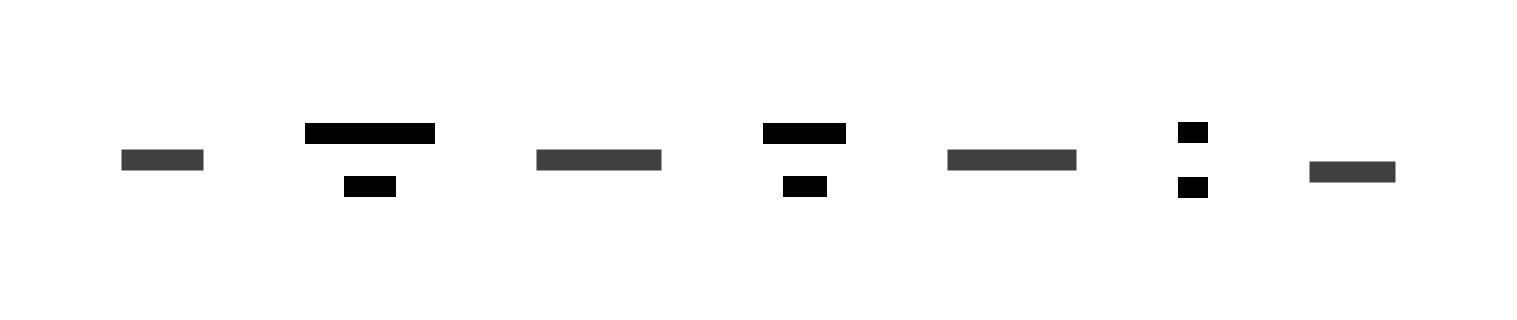
The Bevy Game sends an HTTP request to the Actix Web Server. The server passes the data to the ORM, which then writes to PostgreSQL. The response travels back the same way.
Four things to set up, keep in sync, and debug. Database, ORM, server, all wired together and every schema change touches all of them.
System 3: Real-Time Updates (State Synchronization)
Sara moves, how does John’s screen update?
You could poll: John asks the server “where is everyone?” 30 times a second. Slow, expensive, and doesn’t scale.
The right way is push-based: the server tells John the moment Sara moves. But in a traditional setup, you build that architecture yourself:

What makes this hard is that your game code and your networking code end up being two separate things that have to stay in sync. Every time you add something new, a door that opens, an item you can pick up, you have to update both. One missed update and you’re debugging for hours.
System 4: Game Logic Validation (Server Authority)
Who decides if a move is valid? If the player’s computer does, cheaters just edit their memory and teleport. Or send a fake message straight to your server. The client can’t be trusted. The server decides.
In a traditional setup that means writing a check for every action. Move? Check the destination is reachable. Pick up item? Check it’s actually there. Every new mechanic, a new check. And if anything fails midway, you need code to undo the partial change.

SpacetimeDB
In summary, here’s everything you’d need to build from scratch:
| System | Functionalities |
|---|---|
| Identity | Auth server, token generation, client-side storage, middleware |
| Persistence | PostgreSQL, migrations, ORM configuration, connection pool |
| Real-Time | WebSocket server, connection pool, broadcast logic |
| Validation | Endpoint validators, rollback logic, consistency rules |
And none of these systems live in isolation. Your WebSocket server needs to talk to your database. Your move checks need to run before anything gets saved. Your token system needs to verify who’s talking before any of the above can happen. Every place one system touches another is a place where things can silently break.
All of this before two players have seen each other move on screen.
It’s a lot.
But what if you didn’t have to build any of it?
What if one thing handled all of it, the database, the websocket server, the auth, the game logic?
That thing is SpacetimeDB.
Instead of four separate systems stitched together, you write one Rust module that runs inside the database engine. The module defines your data as Rust structs (tables) and your logic as Rust functions (reducers). SpacetimeDB handles everything else:
- Identity: SpacetimeDB has authentication built in. Every player gets a permanent ID the moment they connect, no login system, no token management, no auth server to build.
- Persistence: mark a Rust struct with
#[spacetimedb::table]and it becomes a database table. No PostgreSQL to install, no ORM to configure, no need of manual data wiring. - Real-Time: mark a table as
publicand SpacetimeDB pushes row-level changes to every subscribed client automatically. No WebSocket code to write. - Validation: reducers run as atomic transactions. If your logic returns an error, the entire transaction rolls back, guaranteed.
What took four separate systems to build, deploy, and maintain now fits in a single Rust module, one thing to write, one thing to publish, one place to look when something breaks. Let’s set it up now.
Installing SpacetimeDB
Let’s set up the tools. SpacetimeDB’s CLI handles everything: creating modules, building, running locally, deploying.
Installing the CLI
On macOS and Linux:
curl -sSf https://install.spacetimedb.com | sh
On other platforms, follow the official install guide.
Verify it installed correctly:
spacetime version list
Upgrading to v2
SpacetimeDB is actively developed. For this chapter, we need v2.1.0 or newer. Check what version you have running by default, and if you’re on v1.x, install and switch to v2:
# Install v2.1.0
spacetime version install 2.1.0

# Set it as the default
spacetime version use 2.1.0

# Confirm
spacetime version list
# Should show: 2.1.0 (current)
Upgrading Rust
SpacetimeDB v2.0 requires Rust 1.93.0 or newer. Check your version and update if needed:
rustc --version
rustup update stable
Starting a Local Server
Open a new terminal window and start a local SpacetimeDB instance. Keep this running as you work:
spacetime start
This gives you a local server at http://127.0.0.1:3000. The same way you might run a local Postgres database during development, except SpacetimeDB is already a WebSocket server as well.
Creating the Server Module
The server-side code for our game lives in a server/ directory alongside our Bevy game. A separate Rust crate that compiles to WebAssembly and uploads to SpacetimeDB.
From your chapter12/ project root, create the directory:
mkdir -p server/src
Create server/Cargo.toml:
[package]
name = "bevy-game-server"
version = "0.1.0"
edition = "2024"

[lib]
crate-type = ["cdylib"]

[dependencies]
spacetimedb = "2.0"
log = "0.4"
petname = { version = "2.0", default-features = false, features = ["default-words"] }
getrandom = { version = "0.2", features = ["custom"] }
Let’s walk through each decision here.
crate-type = ["cdylib"] tells Cargo to produce a library SpacetimeDB can load as a WASM binary.
spacetimedb = "2.0" is the SDK. It gives you tables and reducers, the two things you’ll use throughout this chapter.
petname generates readable random names like "brave-purple-fox" for auto-assigning usernames. We disable default features and only pull in default-words because petname’s default RNG doesn’t work in WASM.
getrandom = { version = "0.2", features = ["custom"] } This fixes a build issue. Petname uses getrandom internally, which normally asks the OS for a random seed but inside WASM there is no OS. The custom feature switches it to use SpacetimeDB’s own RNG instead. Declaring it in your own Cargo.toml forces the entire build to use that version. Without this line, compilation fails.
Building Blocks of SpacetimeDB
The two concepts you will use throughout this chapter are tables and reducers.
A table is a Rust struct with #[spacetimedb::table] on it. SpacetimeDB creates and manages the actual storage for you, no CREATE TABLE, no SQL. The struct’s fields become the columns. Here’s the Player table we’ll define shortly:
//Pseudo code, don't use
#[spacetimedb::table(accessor = player, public)]
pub struct Player {
    #[primary_key]
    identity: Identity,
    #[unique]
    username: String,
    position_x: f32,
    position_y: f32,
    is_online: bool,
}
Reading a row looks like ctx.db.player().identity().find(sender). Writing a row looks like ctx.db.player().insert(...). The public flag means subscribed clients receive every change to this table in real time.
A reducer is a Rust function marked with #[spacetimedb::reducer]. When a client calls it, it runs on the server as an all-or-nothing transaction — either everything succeeds and saves, or something fails and nothing is written. Here’s the simplest one:
//Pseudo code, don't use
#[spacetimedb::reducer(init)]
pub fn init(_ctx: &ReducerContext) {
    log::info!("Server module initialized");
}
To see why all-or-nothing matters, imagine a reducer that makes two database changes and the second one fails. Consider this pick_up_item reducer:
//Pseudo code, don't use
#[spacetimedb::reducer]
pub fn pick_up_item(ctx: &ReducerContext, item_id: u64) -> Result<(), String> {
    // Step 1: remove the item from the world
    ctx.db.world_item().id().delete(item_id);

    // Step 2: check the player has room in their inventory
    let player = ctx.db.player().identity().find(ctx.sender())
        .ok_or("Player not found")?;

    if player.inventory_count >= 10 {
        // Inventory full — return an error.
        // SpacetimeDB rolls back Step 1 automatically:
        // the item reappears in the world as if nothing happened.
        return Err("Inventory is full".to_string());
    }

    // Step 3: add the item to the player's inventory
    ctx.db.inventory().insert(InventoryItem { owner: ctx.sender(), item_id });

    Ok(())
}
First we delete the item from the world. However, if later we find the inventory is full, SpacetimeDB undoes the initial delete, the item reappears as if it was never touched. You don’t have to write cleanup code for failure cases; the atomic transaction guarantees it.
Defining the Player Table
Now let’s actually build the module. Here’s what it needs to handle:
| Event | Action |
|---|---|
| John connects for the first time | We create a record for him, generated name, position assigned and marked online |
| John connects again | We find his existing record and mark him online, name and position exactly as he left them |
| John disconnects | We mark him offline |
| John wants a custom name | We call a reducer; the server validates and updates his name |
Everything flows through one table, Player and a handful of reducers. Let’s define the table first.
Create server/src/lib.rs and start with the table definition:
// server/src/lib.rs
use petname::Generator;
use spacetimedb::{Identity, ReducerContext, Table};

// Map dimensions: 241 tiles × 169 tiles × 64px per tile
const SPAWN_X: f32 = 7712.0; // center of world
const SPAWN_Y: f32 = 5408.0;

#[spacetimedb::table(accessor = player, public)]
pub struct Player {
    #[primary_key]
    identity: Identity,
    #[unique]
    username: String,
    position_x: f32,
    position_y: f32,
    is_online: bool,
}
#[spacetimedb::table(accessor = player, public)]
This macro transforms the Player struct into a database table. SpacetimeDB will create a persistent table with these exact columns. Every field in the struct becomes a column.
The accessor = player argument gives the table a name. Inside reducers, you’ll access it as ctx.db.player() , it helps with querying and modifying this table.
The public flag means clients are allowed to subscribe to this table. When a client subscribes (which we’ll implement in the next chapter), SpacetimeDB will push every row to them immediately, and then push any future changes in real-time. Without public, only server-side reducer code can see the data.
#[primary_key] identity: Identity
Identity is a SpacetimeDB built-in type, a 256-bit unique identifier that the server automatically assigns to each client connection. It persists across sessions: the same player connecting from the same device will always have the same Identity.
So is Identity based on the user’s device?
Not exactly the device, but the token file on it. When a client connects for the first time, SpacetimeDB’s SDK generates a cryptographic key and saves it as a token file on disk. The Identity is derived from that key. As long as that token file exists on the same machine, every future connection produces the same Identity.
If John deletes the token file, reinstalls the game, or connects from a different computer, SpacetimeDB sees a new token and creates a new Identity.
#[unique] username: String — the #[unique] attribute tells SpacetimeDB to create an index on this field and enforce that no two rows share the same value. It also generates a .username() accessor, so you can look up a player by name directly with ctx.db.player().username().find(&name) — a fast indexed lookup rather than a full table scan.
position_x and position_y will store where the player is standing in the world. We initialize them to the center of the map (SPAWN_X, SPAWN_Y), which we calculated from our world dimensions: 241 tiles × 64 pixels wide, 169 tiles × 64 pixels tall.
is_online tracks whether the player is currently connected. This is how we distinguish between “this player exists but left” and “this player is actively playing right now.”
Generating Human-Readable Usernames
Before writing the reducers, let’s build the username generator. Ideally a player would type their own name, but that requires a name-entry screen, input handling, and form submission before the game even starts. By generating a name automatically on first connect, we can keep it simple.
// server/src/lib.rs (continued)

fn generate_username(ctx: &ReducerContext) -> String {
    let mut rng = ctx.rng();
    let petnames = petname::Petnames::default();
    petnames
        .generate(&mut rng, 3, "-")
        .unwrap_or_else(|| format!("player-{}", ctx.timestamp.to_micros_since_unix_epoch()))
}
A normal random number generator produces a different result every time you run it. But SpacetimeDB requires reducers to be deterministic: given the same inputs, they must always produce the same result. This is what allows SpacetimeDB to safely replay or audit transactions.
ctx.rng() satisfies that requirement. It’s seeded from the transaction’s timestamp, so it produces the same sequence for a given transaction but a different sequence for different transactions. We pass &mut rng to petnames.generate() along with 3 (three words) and "-" as the separator. The result is a name like "brave-purple-fox" or "calm-dancing-hawk".
So if the same inputs produce the same result, won’t all players get the same name?
No, each connection is a separate transaction with a different timestamp. “Same inputs” means the same transaction, not all transactions. Two players connecting at different moments have different timestamps, get different RNG seeds, and therefore get different names. The determinism guarantee is per-transaction, not across transactions.
SpacetimeDB also processes transactions sequentially, each one completes before the next begins. So even two players connecting at the exact same instant are queued and executed one after the other, each receiving a distinct timestamp in order. No two transactions ever share the same timestamp.
You’ll also notice the use petname::Generator; added in the imports. The generate() method lives on the Generator trait, not directly on the Petnames struct. In Rust, traits must be in scope for their methods to be callable. Without this import, the compiler would tell you the method doesn’t exist, even though it’s implemented right there.
Writing the Reducers
Now for the heart of our server module, the reducers.
Wait, why are they called reducers?
The name comes from functional programming. A “reduce” operation takes some existing state and an input, and produces new state. Redux, the popular JavaScript state management library, made this pattern mainstream: a reducer is a function of the form (currentState, action) => newState.
SpacetimeDB uses the same idea. A reducer takes the current state of the database and an incoming action, the call from a client, and produces a new database state. The key property is that given the same starting state and the same input, a reducer always produces the same result. That determinism is what makes it safe to run as a transaction: SpacetimeDB can apply it, roll it back, or replay it, and the outcome is always predictable.
Now back to writing the reducers. We need four of them.
Module Startup
The first reducer SpacetimeDB calls is init. It runs exactly once, when you publish the module for the first time. Think of it as a setup hook: a place to run any one-time initialization before players start connecting. In later chapters, this is where we’ll seed the world with spawn points or map configuration. For now, we just log that it ran so we can confirm the publish worked.
// server/src/lib.rs (continued)

#[spacetimedb::reducer(init)]
pub fn init(_ctx: &ReducerContext) {
    log::info!("Server module initialized");
}
A Client Connects
Every time a client opens a connection, whether it’s John connecting for the first time or returning after a week away, SpacetimeDB automatically calls the client_connected reducer. We don’t invoke it ourselves; SpacetimeDB fires it the moment the connection is established, before the client receives any data.
This reducer has two jobs depending on who’s connecting:
- First-time player: create a fresh record with a generated name and place them at the world spawn point.
- Returning player: find their existing record and mark them online, their name and last position from the previous session are already saved.
// server/src/lib.rs (continued)

#[spacetimedb::reducer(client_connected)]
pub fn identity_connected(ctx: &ReducerContext) {
    let sender = ctx.sender();
    if let Some(player) = ctx.db.player().identity().find(sender) {
        // Returning player — mark them online
        log::info!("Player '{}' reconnected", player.username);
        ctx.db.player().identity().update(Player {
            is_online: true,
            ..player
        });
    } else {
        // New player — create their record
        let username = generate_username(ctx);
        log::info!("New player '{}' joined", username);
        ctx.db.player().insert(Player {
            identity: sender,
            username,
            position_x: SPAWN_X,
            position_y: SPAWN_Y,
            is_online: true,
        });
    }
}
ctx.sender() gives us the Identity of whoever just connected. We then call .identity().find(sender) to look for an existing row in the Player table.
If a row is found, John has connected before, we update just is_online to true. The ..player syntax is Rust’s struct update shorthand: it means “copy all fields from player unchanged, except the ones I’ve listed here.” So John’s username, position, and everything else stays exactly as it was.
If no row is found, John is new, we call generate_username(ctx) to produce a random name and insert a brand new row at the world spawn coordinates (SPAWN_X, SPAWN_Y).
A Client Disconnects
When a connection closes, whether John quit the game, lost his internet, or the game crashed, SpacetimeDB automatically calls the client_disconnected reducer.
The goal is simple: find John’s record and mark him offline. We don’t delete the row. That’s intentional, his position stays saved in the database, so the next time he connects, he’ll reappear exactly where he left off.
// server/src/lib.rs (continued)

#[spacetimedb::reducer(client_disconnected)]
pub fn identity_disconnected(ctx: &ReducerContext) {
    let sender = ctx.sender();
    if let Some(player) = ctx.db.player().identity().find(sender) {
        log::info!("Player '{}' disconnected", player.username);
        ctx.db.player().identity().update(Player {
            is_online: false,
            ..player
        });
    } else {
        log::warn!("Disconnect for unknown identity: {:?}", sender);
    }
}
We look up the disconnecting player’s row with ctx.sender(). If found, we flip is_online to false, the same ..player struct update pattern as before, copying everything else unchanged.
The else branch handles a disconnect for an Identity with no record. This shouldn’t happen under normal operation, every disconnect should follow a connect, but network edge cases exist. Rather than crashing the server, we log a warning and move on. It’s safe to ignore, but visible in the logs if something unexpected is happening.
Choosing a Custom Name
The three reducers above are all lifecycle reducers, SpacetimeDB calls them automatically. register_player is different: it’s a regular reducer the client calls deliberately. It’s also useful right now as a way to manually test whether our code is working, we can call it from the CLI and then check the database to confirm the change went through.
// server/src/lib.rs (continued)

#[spacetimedb::reducer]
pub fn register_player(ctx: &ReducerContext, username: String) -> Result<(), String> {
    if username.is_empty() {
        return Err("Username must not be empty".to_string());
    }
    if username.len() > 32 {
        return Err("Username must be 32 characters or less".to_string());
    }

    let sender = ctx.sender();

    // Check if the username is already taken by a different player
    if ctx.db.player().username().find(&username)
        .is_some_and(|p| p.identity != sender)
    {
        return Err(format!("'{}' is already taken", username));
    }

    if let Some(player) = ctx.db.player().identity().find(sender) {
        log::info!("Player '{}' renamed to '{}'", player.username, username);
        ctx.db.player().identity().update(Player {
            username,
            ..player
        });
        Ok(())
    } else {
        Err("Cannot rename: player not found. Connect first.".to_string())
    }
}
The function runs three checks before writing anything. First, basic validation: the name can’t be empty or over 32 characters. Second, uniqueness: ctx.db.player().username().find(&username) looks up any existing row with that name using the index created by #[unique], a direct lookup rather than scanning every row. The .is_some_and(|p| p.identity != sender) check returns true only if the name is taken by a different player, so a player can re-submit their own current name without hitting an error. If the name is taken, we return Err and nothing is written.
If all checks pass, we find the caller’s record with ctx.sender(), update the username field, and return Ok(()). The log::info! records both the old and new name, which is useful when reading server logs.
Building the Module
We don’t use cargo build for SpacetimeDB modules. We use spacetime build, which compiles to wasm32-unknown-unknown (the WebAssembly target) and packages the result correctly.
From inside the server/ directory:
cd server
spacetime build
You should see Cargo compile all the dependencies, then finish with:
Build finished successfully.
wasm-opt not being found. This is an optional optimizer that shrinks the compiled WASM file for faster uploads. You can safely ignore it during development, or install it with brew install binaryen to make it go away.
Publishing to Your Local Server
Make sure spacetime start is still running in its terminal, then publish the module:
spacetime publish --server http://127.0.0.1:3000 bevy-game
You should see:
Build finished successfully.
Uploading to http://127.0.0.1:3000 ...
Publishing module...
Updated database bevy-game
The module is now running inside your local SpacetimeDB instance.
Viewing the Logs
Open another terminal and watch the server logs:
spacetime logs --server http://127.0.0.1:3000 bevy-game -f
You should see Server module initialized — that’s your init reducer confirming it ran.
Testing with SQL
SpacetimeDB supports SQL queries directly against your tables. Let’s verify the schema was created correctly:
spacetime sql --server http://127.0.0.1:3000 bevy-game "SELECT * FROM player"
You’ll see the column headers with an empty table — which is exactly right!
 identity | username | position_x | position_y | is_online
----------+----------+------------+------------+-----------
The table is empty because the Player rows are only created when a client connects. No client has connected yet, our Bevy game doesn’t have the connection code yet. But the schema is there and correct.
Testing Reducers from the CLI
We don’t need to build the Bevy client to test our reducers. The spacetime call command lets us invoke any reducer directly from the terminal, which is incredibly useful for verifying your server logic in isolation.
# This works
spacetime call --server http://127.0.0.1:3000 bevy-game register_player '"TestPlayer"'
When you run spacetime call, something interesting happens behind the scenes. The CLI doesn’t just fire the reducer in isolation, it opens a real WebSocket connection to SpacetimeDB using its own identity. That means our identity_connected lifecycle reducer fires first, creating a fresh player row with a generated name. Then register_player runs, finds that row, and renames it to "TestPlayer". Finally, the CLI connection closes and identity_disconnected fires, setting is_online to false.
You can see all of this by querying the table immediately after:
spacetime sql --server http://127.0.0.1:3000 bevy-game "SELECT * FROM player"
 identity | username     | position_x | position_y | is_online
----------+--------------+------------+------------+-----------
 0x.....  | "TestPlayer" | 7712       | 5408       | false
Three things worth noticing here:
-
identityis a long hex value, that’s the 256-bit Identity the CLI is using. Unlike a session cookie, this identity is stored persistently in the CLI’s config on your machine. Everyspacetime callyou make from this machine reuses the same token and therefore the same identity. -
position_xandposition_yare7712and5408, exactly ourSPAWN_XandSPAWN_Yconstants. The player was placed at the center of the world automatically byidentity_connected. -
is_onlineisfalse, the CLI connection closed immediately after the reducer returned, soidentity_disconnectedfired and marked the player offline. This is correct behaviour. When our Bevy client connects and stays open, this field will betruethe entire session.
Why does calling register_player again update the same row instead of creating a new player?
Because the CLI behaves exactly like your game client will. It stores a token file on your machine. Every spacetime call reuses that token → same Identity → identity_connected finds your existing row and marks it online instead of creating a new one. You are always the same player on this machine.
This is the intended behaviour. When John installs the game on his computer and Sara installs it on hers, they each have different token files, different identities, and different rows. The CLI mirrors that exactly.
To simulate a second player from the terminal, get a new server-issued identity:
# Save your current token first so you can restore it later
spacetime login show --token

# Log out, then get a fresh identity from the local server
spacetime logout
spacetime login --server-issued-login http://127.0.0.1:3000
Now the next spacetime call connects with a fresh identity — identity_connected finds no existing row and inserts a new player. Run the SQL query and you’ll see two rows.
To restore your original identity:
spacetime login --token <your-original-token>
Here’s what we’ll implement, clicking Multiplayer on the main menu will connect the game to the local SpacetimeDB server, show a live connection status screen, and recognize the same player on every subsequent reconnect using a saved token. We’ll keep the single player as it is.
Connecting the Bevy Client
The server works. Now let’s connect the game to it.
In this architecture, our Bevy game is the client, the program running on the player’s machine. Its job is to show the game world, respond to player input, and talk to the server. It doesn’t make decisions about what’s valid or what gets saved; it just sends requests and reacts to what the server sends back.
Everything we’ve built so far, the map, the characters, the combat, runs entirely on the player’s machine. In single-player, that’s all it ever needs to do. In multiplayer, the client also needs to stay in sync with the server: other players’ positions, who’s online, what changed while you were away.
Now, we add that connection layer. It only activates when the player clicks Multiplayer, single-player is completely untouched.
spacetimedb-sdk is the Rust client library. It handles WebSocket connections, authentication, message parsing, and the client-side cache of subscribed table rows. We don’t build any of that ourselves.
Open Cargo.toml in your chapter_12/ root and add one line:
[dependencies]
bevy = { version = "0.19", features = ["mp3", "wav"] }
bevy_procedural_tilemaps = "0.4"
# ... other deps ...
spacetimedb-sdk = "2.1.0"   # ← add this
Generate Client Bindings
If you’ve used GraphQL, this will feel familiar. A GraphQL schema describes what data your server exposes, and tools like Apollo or codegen generate typed client code from it, so your frontend gets auto-complete and compiler errors instead of hand-written fetch calls.
Bindings work the same way here: the SpacetimeDB CLI reads your compiled server module and generates typed Rust code for your game client, methods like conn.db.player() and ctx.db.player().identity().find(...) that map directly to the tables and reducers you defined. Change your server schema and regenerate, the client code updates to match.
Run this from inside the server/ directory:
Ensure to replace {ADD_FULL_PATH_TO_CHAPTER12} with path to your chapter12 folder
cd server
spacetime generate --lang rust \
  --out-dir {ADD_FULL_PATH_TO_CHAPTER12}/src/module_bindings \
  --module-path .
You’ll see:
Writing file src/module_bindings/player_table.rs
Writing file src/module_bindings/player_type.rs
Writing file src/module_bindings/register_player_reducer.rs
Writing file src/module_bindings/mod.rs
Generate finished successfully.
These files are generated code, don’t edit them by hand. Any time you change the server schema (add a field, rename a reducer, add a new table), re-run spacetime generate and they’ll be regenerated automatically.
Track Game Mode
GameMode helps us track the user’s choice of if they want a single player or a multiplayer.
Add this to src/state/game_state.rs, right below the GameState enum:
// src/state/game_state.rs

use bevy::prelude::*;

#[derive(States, Default, Debug, Clone, Copy, PartialEq, Eq, Hash)]
pub enum GameState {
    #[default]
    MainMenu,
    Loading,
    Playing,
    Paused,
    GameOver,
}

// ↓ Add these
#[derive(Resource, Debug, Clone, PartialEq, Eq)]
pub enum GameMode {
    SinglePlayer,
    Multiplayer,
}

pub fn in_multiplayer(mode: Option<Res<GameMode>>) -> bool {
    mode.is_some_and(|m| *m == GameMode::Multiplayer)
}
GameMode is a plain Rust enum decorated with #[derive(Resource)]. That’s all Bevy needs to treat it as a global resource, no component, no entity, just a value attached to the world.
in_multiplayer is a run condition, a function Bevy evaluates before running a system. If it returns false, the system is skipped entirely. We define it here in the state module (not in the network module) so that main.rs and the loading screen can also use it to gate non-network systems like map generation.
Update the Main Menu
Now we wire GameMode to the buttons. Three changes to src/state/main_menu.rs:
Import GameMode
use super::{GameState, GameMode}; // was: use super::GameState;
Add the Multiplayer variant to the button enum:
#[derive(Component)]
pub enum MainMenuButton {
    NewGame,
    LoadGame,
    Multiplayer,  // ← add this
    Quit,
}
Add the button to the list and handle both new clicks:
let buttons = [
    (MainMenuButton::NewGame, "New Game"),
    (MainMenuButton::LoadGame, "Load Game"),
    (MainMenuButton::Multiplayer, "Multiplayer"),  // ← add this
    (MainMenuButton::Quit, "Quit"),
];
And in the button handler, update the match to set the mode on each relevant button:
match button {
    MainMenuButton::NewGame => {
        commands.insert_resource(GameMode::SinglePlayer);  // ← add this
        next_state.set(GameState::Loading);
    }
    MainMenuButton::LoadGame => {
        ui_state.active = true;
        ui_state.mode = SaveLoadMode::Load;
    }
    MainMenuButton::Multiplayer => {                        // ← add this arm
        commands.insert_resource(GameMode::Multiplayer);
        next_state.set(GameState::Loading);
    }
    MainMenuButton::Quit => {
        exit.write(AppExit::Success);
    }
}
Initialize GameMode in the StatePlugin
We set a default so GameMode always exists in the world, even before any button is pressed.
In src/state/mod.rs, add three lines:
pub use game_state::GameState;
pub use game_state::GameMode;        // ← re-export so other modules can use it
pub use game_state::in_multiplayer;  // ← re-export the run condition

impl Plugin for StatePlugin {
    fn build(&self, app: &mut App) {
        app
            .insert_resource(GameMode::SinglePlayer)  // ← add default
            .init_state::<GameState>()
            // Gate the loading screen: multiplayer shows its own connection screen
            .add_systems(OnEnter(GameState::Loading),
                // update below line
                loading::spawn_loading_screen.run_if(not(in_multiplayer)))
            // ... rest unchanged
    }
}
We gate the loading screen behind not(in_multiplayer). When the player clicks Multiplayer, we show our own connection status screen instead of the single player map loading process.
Create the NetworkPlugin
All the pieces are in place, the SDK is installed, the bindings are generated, the mode is tracked, and the menu sets it. Now we need to implement basic networking.
We’ll create NetworkPlugin, it owns everything network-related: opening the connection, processing incoming messages each frame, showing a connection status screen, and cleaning up when the player leaves.
We split it across two files: mod.rs for the plugin definition, and connection.rs for everything else.
Create network folder inside the src directory and inside src/network/mod.rs
// src/network/mod.rs

mod connection;

use bevy::prelude::*;

use crate::module_bindings::DbConnection;
use crate::state::{in_multiplayer, GameState};

use connection::{
    cleanup_network, connect_to_spacetimedb, despawn_multiplayer_screen,
    handle_multiplayer_back, process_spacetimedb_messages, spawn_multiplayer_screen,
    update_multiplayer_screen,
};

#[derive(Resource)]
pub struct SpacetimeConnection {
    pub conn: DbConnection,
}

pub struct NetworkPlugin;

impl Plugin for NetworkPlugin {
    fn build(&self, app: &mut App) {
        app.add_systems(
            OnEnter(GameState::Loading),
            (connect_to_spacetimedb, spawn_multiplayer_screen).run_if(in_multiplayer),
        )
        .add_systems(
            Update,
            (
                process_spacetimedb_messages
                    .run_if(resource_exists::<SpacetimeConnection>),
                update_multiplayer_screen.run_if(in_state(GameState::Loading)),
                handle_multiplayer_back.run_if(in_state(GameState::Loading)),
            )
                .run_if(in_multiplayer),
        )
        .add_systems(
            OnExit(GameState::Loading),
            despawn_multiplayer_screen,
        )
        .add_systems(
            OnEnter(GameState::MainMenu),
            cleanup_network.run_if(resource_exists::<SpacetimeConnection>),
        );
    }
}
The .run_if(...) conditions make sure systems only run when they’re needed. in_multiplayer is the top-level gate, in single-player, none of these systems run at all.
Here when the state enters loading, we initialize the connect to spacetimedb server and we spawn the multiplayer screen.
Later, we process messages from server if the connection goes through. We also update multiplayer screen with the status and allow the user to go back to main menu.
Now let’s implement this, create src/network/connection.rs
This has five mini systems: opening the connection, ticking incoming messages every frame, showing a status screen, updating the status text, and cleaning up when the player leaves. Let’s go through each one.
Mini System 1: Connecting
connect_to_spacetimedb runs once when multiplayer loading begins. Its job: load the saved identity from disk, open a WebSocket connection to the server, register callbacks for connection events, subscribe to the Player table, and store the live connection as a Bevy resource so other systems can use it.
The callbacks on_connect, on_connect_error, on_disconnect, are closures you register at build time. The SDK fires them when the corresponding event arrives over the wire.
// src/network/connection.rs

use std::path::PathBuf;

use bevy::prelude::*;
use spacetimedb_sdk::{DbContext, Table};

use crate::module_bindings::player_table::{playerQueryTableAccess, PlayerTableAccess};
use crate::module_bindings::DbConnection;
use crate::state::{GameMode, GameState};
use super::SpacetimeConnection;

const SPACETIMEDB_URI: &str = "http://127.0.0.1:3000";
const DATABASE_NAME: &str = "bevy-game";
const TOKEN_FILENAME: &str = "spacetimedb_token";

fn token_path() -> Option<PathBuf> {
    let exe = std::env::current_exe().ok()?;
    Some(exe.parent()?.join(TOKEN_FILENAME))
}

fn load_token() -> Option<String> {
    let path = token_path()?;
    let contents = std::fs::read_to_string(&path).ok()?;
    let trimmed = contents.trim();
    if trimmed.is_empty() { None } else { Some(trimmed.to_string()) }
}

fn save_token(token: &str) -> std::io::Result<()> {
    let path = token_path().ok_or_else(|| {
        std::io::Error::new(std::io::ErrorKind::Other, "could not determine executable path")
    })?;
    std::fs::write(path, token)
}

pub fn connect_to_spacetimedb(mut commands: Commands) {
    let token = load_token();

    let conn = DbConnection::builder()
        .with_uri(SPACETIMEDB_URI)
        .with_database_name(DATABASE_NAME)
        .with_token(token)
        .on_connect(|ctx, _identity, token| {
            if let Err(e) = save_token(token) {
                error!("Failed to save SpacetimeDB token: {e}");
            }
            info!("Connected to SpacetimeDB");
            ctx.subscription_builder()
                .on_applied(|ctx| {
                    if let Some(identity) = ctx.try_identity() {
                        if let Some(player) = ctx.db.player().identity().find(&identity) {
                            info!("Playing as: {}", player.username);
                            return;
                        }
                    }
                    info!("Player subscription applied");
                })
                .on_error(|_ctx, err| {
                    error!("Subscription error: {err}");
                })
                .add_query(|q| q.from.player())
                .subscribe();
        })
        .on_connect_error(|_ctx, err| {
            error!("SpacetimeDB connection error: {err}");
        })
        .on_disconnect(|_ctx, err| {
            if let Some(e) = err {
                warn!("Disconnected from SpacetimeDB with error: {e}");
            } else {
                info!("Disconnected from SpacetimeDB");
            }
        })
        .build();

    match conn {
        Ok(conn) => {
            info!("SpacetimeDB connection initiated");
            commands.insert_resource(SpacetimeConnection { conn });
        }
        Err(e) => {
            error!("Failed to initiate SpacetimeDB connection: {e}");
        }
    }
}
Note the two imports from the generated bindings: PlayerTableAccess brings in the .player() method for querying the client cache; playerQueryTableAccess brings in the .player() method for building subscription queries. Both are needed, both come from spacetime generate. We also import Table from the SDK, that trait provides the .iter() method we’ll use later to list online players.
This system runs once when we enter GameState::Loading, but only in multiplayer mode.
token_path() finds the running executable with std::env::current_exe() and places the token file next to it, target/debug/spacetimedb_token in development, and next to the binary in a release build. load_token() reads and trims that file, returning None on first launch. save_token() writes the raw token string. When the token is None, SpacetimeDB creates a new identity; when it’s Some, you reconnect as the same player.
The builder. DbConnection::builder() is a fluent API. We chain:
.with_uri(...)— the server address.with_database_name(...)— which database to connect to (the name you used inspacetime publish).with_token(token)— the saved identity, if any.on_connect(...)— callback that fires when the WebSocket is established.on_connect_error(...)— callback if the server is unreachable.on_disconnect(...)— callback when the connection closes
Inside on_connect. The first thing we do is save the token the server just issued, that’s what makes the same identity persist across sessions. Then we subscribe to the Player table. The on_applied callback fires once SpacetimeDB has pushed all the initial rows, at which point we look up the player row by identity and log their username.
.build() is non-blocking. It returns immediately with Ok(conn) or Err(...). The connection happens in the background; callbacks fire when messages arrive. On success, we insert SpacetimeConnection as a Bevy resource, that’s the signal to the rest of the game that a live connection exists.
Mini System 2: Processing Messages Every Frame
// src/network/connection.rs (continued)

pub fn process_spacetimedb_messages(connection: Res<SpacetimeConnection>) {
    if let Err(e) = connection.conn.frame_tick() {
        error!("SpacetimeDB frame_tick error: {e}");
    }
}
frame_tick() processes all WebSocket messages that have arrived since the last call and fires the corresponding callbacks. Call it once per frame and your client stays sync with everything happening on the server.
When you connect for the first time, the server runs identity_connected and inserts a new Player row. That insert is packaged as a message and sent back over the WebSocket. The next time frame_tick() runs, it picks up that message and writes the new row into the client-side cache, an in-memory copy of the subscribed table rows that the SDK maintains automatically. Once it’s in the cache, you can read it instantly with ctx.db.player().identity().find(...), no network round-trip needed.
Later milestones will add more messages: other players’ positions updating, chat arriving, world state syncing. All of them come through this same call.
resource_exists::<SpacetimeConnection> guards it: if we haven’t connected yet or have already cleaned up, the system is skipped.
But process_spacetimedb_messages doesn’t do anything except check for errors, so it’s not storing anything, right?
It looks that way, but the storage is happening inside frame_tick() itself. When a message arrives, say, a new Player row was inserted, the SDK processes it and writes the row into the client-side cache automatically. You don’t write any code for that part; it’s built into the SDK. frame_tick() is the trigger that lets the SDK do its work. The if let Err(e) is just there to surface any problems. In future milestones, you’ll also register row callbacks (on_insert, on_update) that fire during this same call when you need to react to specific changes, like spawning a Bevy entity for a player who just joined.
Why frame_tick() instead of running the SDK on its own thread?
The SDK offers run_threaded() as an alternative, which spawns a background thread that processes messages automatically. But callbacks would then fire on that thread , not the Bevy main thread , making it unsafe to access Bevy resources or entities from inside them.
frame_tick() keeps everything on the main thread. Callbacks fire during this call, in the same frame as everything else. In future milestones, when a player moves and we need to update their Bevy transform component, the callback will be able to do that directly. No synchronization overhead, no Arc<Mutex<...>> wrappers.
Mini System 3: Multiplayer Connection Screen
While the connection is being established, we show a full-screen overlay with three pieces of information: who you’re connecting as, who else is currently online.
To update those pieces independently each frame, we need a way to find the specific entities. That’s what the three marker components below are for, each one tags a single node in the UI tree so update_multiplayer_screen can query and update them without touching the rest:
MultiplayerScreentags the root node so the entire screen can be despawned in one query when loading endsConnectionStatusTexttags the line that shows your own connection statusOnlinePlayersTexttags the line that lists every other player currently online
// src/network/connection.rs (continued)

#[derive(Component)]
pub struct MultiplayerScreen;

#[derive(Component)]
pub struct ConnectionStatusText;

#[derive(Component)]
pub struct OnlinePlayersText;

pub fn spawn_multiplayer_screen(mut commands: Commands) {
    commands
        .spawn((
            MultiplayerScreen,
            Node {
                width: Val::Percent(100.0),
                height: Val::Percent(100.0),
                justify_content: JustifyContent::Center,
                align_items: AlignItems::Center,
                flex_direction: FlexDirection::Column,
                ..default()
            },
            BackgroundColor(Color::srgb(0.05, 0.05, 0.1)),
        ))
        .with_children(|parent| {
            parent.spawn((
                Text::new("Multiplayer"),
                TextFont { font_size: FontSize::Px(48.0), ..default() },
                TextColor(Color::srgb(0.8, 0.7, 1.0)),
                Node { margin: UiRect::bottom(Val::Px(40.0)), ..default() },
            ));
            parent.spawn((
                ConnectionStatusText,
                Text::new("Connecting..."),
                TextFont { font_size: FontSize::Px(24.0), ..default() },
                TextColor(Color::WHITE),
                Node { margin: UiRect::bottom(Val::Px(20.0)), ..default() },
            ));
            parent.spawn((
                OnlinePlayersText,
                Text::new(""),
                TextFont { font_size: FontSize::Px(18.0), ..default() },
                TextColor(Color::srgb(0.7, 0.9, 0.7)),
                Node { margin: UiRect::bottom(Val::Px(40.0)), ..default() },
            ));
            parent.spawn((
                Text::new("Press Backspace to return to Main Menu"),
                TextFont { font_size: FontSize::Px(18.0), ..default() },
                TextColor(Color::srgba(0.6, 0.6, 0.6, 0.8)),
            ));
        });
}
spawn_multiplayer_screen builds a full-screen flex column: a title, your connection status, a green-tinted list of who else is online, and a hint at the bottom. The OnlinePlayersText node starts empty, it won’t show anything until a connection is established and other players are found in the local cache.
Now we need a system that updates both text nodes every frame:
// src/network/connection.rs (continued)

pub fn update_multiplayer_screen(
    connection: Option<Res<SpacetimeConnection>>,
    mut status_query: Query<
        &mut Text,
        (With<ConnectionStatusText>, Without<OnlinePlayersText>),
    >,
    mut online_query: Query<
        &mut Text,
        (With<OnlinePlayersText>, Without<ConnectionStatusText>),
    >,
) {
    let local_identity = connection.as_ref().and_then(|c| c.conn.try_identity());

    let status = if let Some(conn) = &connection {
        if let Some(identity) = local_identity {
            if let Some(player) = conn.conn.db.player().identity().find(&identity) {
                format!("Connected as: {}", player.username)
            } else {
                "Connected, waiting for player data...".to_string()
            }
        } else {
            "Authenticating...".to_string()
        }
    } else {
        "Connecting...".to_string()
    };

    let online_list = if let Some(conn) = &connection {
        let mut others: Vec<String> = conn
            .conn
            .db
            .player()
            .iter()
            .filter(|p| p.is_online && Some(p.identity) != local_identity)
            .map(|p| p.username)
            .collect();
        others.sort();

        if others.is_empty() {
            "No other players online".to_string()
        } else {
            let mut s = String::from("Online players:");
            for name in others {
                s.push_str("\n- ");
                s.push_str(&name);
            }
            s
        }
    } else {
        String::new()
    };

    for mut text in status_query.iter_mut() {
        text.0 = status.clone();
    }
    for mut text in online_query.iter_mut() {
        text.0 = online_list.clone();
    }
}
The function updates two separate text nodes, so it declares two queries. Both ask for &mut Text, which makes Bevy nervous, it can’t tell at a glance whether the same entity might match both and end up mutably borrowed twice. The Without<> on each query is how we reassure it: status_query only matches entities that have ConnectionStatusText but not OnlinePlayersText, and vice versa. They’re guaranteed to be different entities, so both queries are safe to run at the same time.
But why aren’t the With<> filters using the distinct tags ConnectionStatusText and OnlinePlayersText enough?
Because Bevy checks for conflicts at schedule-build time, before your game has spawned a single entity. At that point it only looks at the query type signatures, not at what you actually created. It sees two queries both asking for &mut Text and asks: could an entity exist that satisfies both filters at the same time? With<ConnectionStatusText> only says what an entity must have, it says nothing about what it must not have. So an entity carrying Text + ConnectionStatusText + OnlinePlayersText would match both queries simultaneously, giving you two mutable references to the same Text component. Bevy can’t rule that out from the types alone, so it panics.
The Without<> closes that gap. Query A requires Without<OnlinePlayersText>, Query B requires With<OnlinePlayersText>. Those two conditions can never both be true on the same entity, it’s a logical impossibility Bevy can verify from the type signatures. That’s the proof it needs to allow both queries in the same system.
The status string builds up through the connection stages shown in the table below. The online list iterates all rows in the client cache, keeps only the ones where is_online is true and the identity isn’t yours, sorts by name, and joins them into a list. If nobody else is online it shows “No other players online” instead of leaving the space blank.
The status transitions through three phases every session:
| Status shown | What it means |
|---|---|
Connecting... |
SpacetimeConnection resource not yet inserted, connection still being built |
Authenticating... |
WebSocket open, waiting for server to confirm identity |
Connected as: brave-purple-fox |
Identity confirmed, player row found in client cache |
Mini System 4: Back to Main Menu
// src/network/connection.rs (continued)

pub fn handle_multiplayer_back(
    input: Res<ButtonInput<KeyCode>>,
    mut next_state: ResMut<NextState<GameState>>,
) {
    if input.just_pressed(KeyCode::Backspace) {
        next_state.set(GameState::MainMenu);
    }
}
Pressing Backspace transitions back to GameState::MainMenu, which triggers cleanup_network. When the Loading state exits, the screen is removed:
// src/network/connection.rs (continued)

pub fn despawn_multiplayer_screen(
    mut commands: Commands,
    query: Query<Entity, With<MultiplayerScreen>>,
) {
    for entity in query.iter() {
        commands.entity(entity).despawn();
    }
}
Mini System 5: Cleanup on Return to Menu
// src/network/connection.rs (continued)

pub fn cleanup_network(mut commands: Commands, connection: Res<SpacetimeConnection>) {
    let _ = connection.conn.disconnect();
    commands.remove_resource::<SpacetimeConnection>();
    commands.insert_resource(GameMode::SinglePlayer);
    info!("Network cleaned up");
}
This runs when we enter GameState::MainMenu from a multiplayer session. It:
- Disconnects cleanly (the server’s
identity_disconnectedreducer fires, marking the player offline) - Removes
SpacetimeConnectionfrom the world soprocess_spacetimedb_messagesno longer runs - Resets
GameModeback toSinglePlayerso “New Game” works normally after
Wiring Up
Four changes to src/main.rs:
// src/main.rs

mod map;
mod characters;
mod state;
mod collision;
mod config;
mod inventory;
mod camera;
mod combat;
mod particles;
mod enemy;
mod save;
mod audio;
mod module_bindings;  // ← add this
mod network;          // ← add this

// ...

fn main() {
    App::new()
        // ... existing plugins ...
        .add_plugins(audio::AudioManagerPlugin)
        .add_plugins(network::NetworkPlugin)   // ← add this
        .add_systems(Startup, prepare_tilemap_handles_resource)
        // Gate map generation: only run in single-player
        .add_systems(OnEnter(GameState::Loading),
            setup_generator.run_if(not(state::in_multiplayer)))    // ← add run_if
        .add_systems(Update,
            poll_map_generation
                .run_if(in_state(GameState::Loading))
                .run_if(not(state::in_multiplayer)))                // ← add run_if
        .run();
}
In multiplayer mode, the map doesn’t exist yet. We’ll address that in a later chapter when we build the shared world.
Let’s run it, both in debug and release mode, so you can see two players connected to the server. Ensure to click on multiplayer on both.
cargo run
cargo run --release
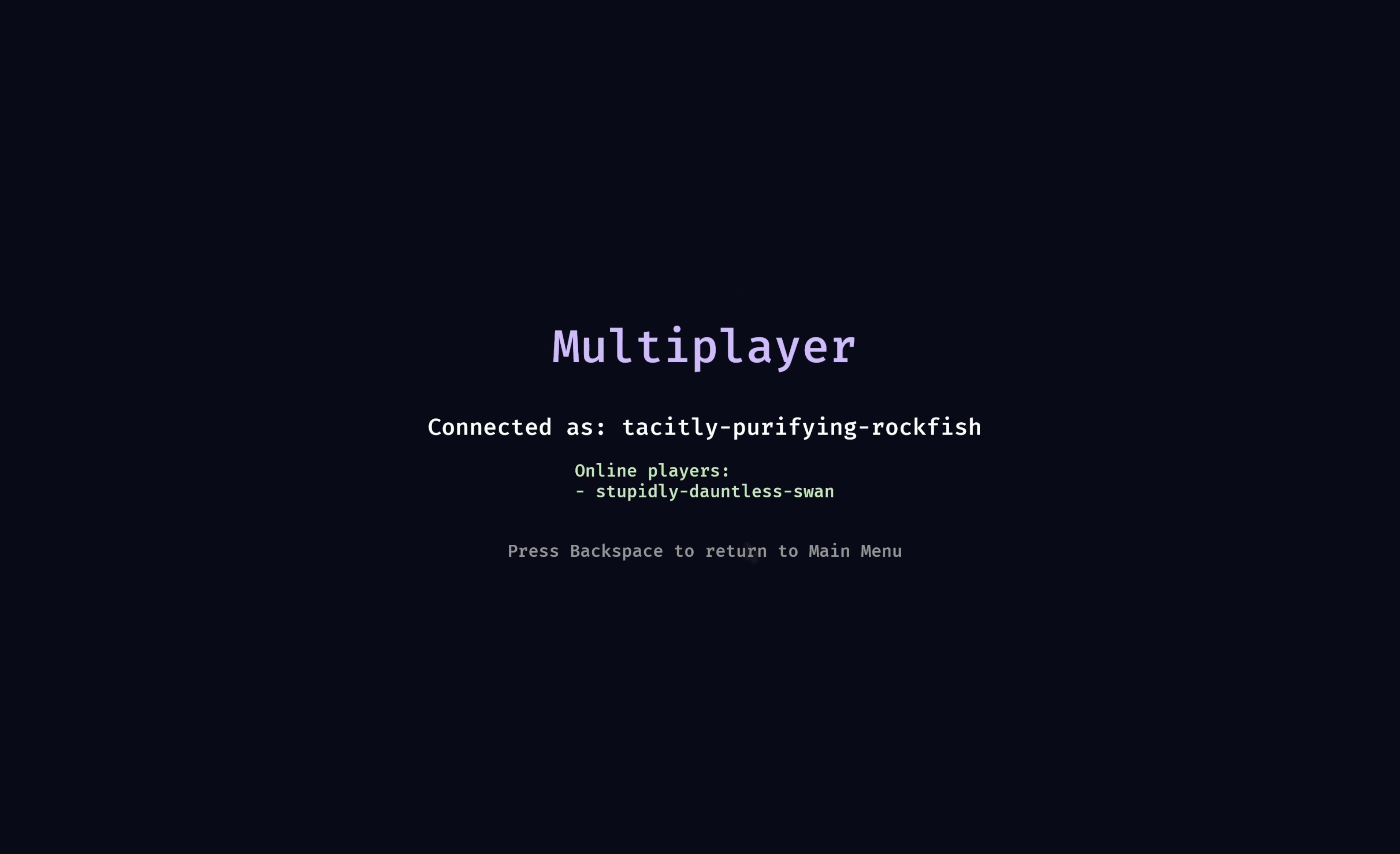
In the upcoming chapter, we’ll see how we can create a shared multiplayer world and sync player movements.
Stay tuned for more chapters, including Multiplayer, AI-driven NPCs, …